
AI video trends in November 2026and how to make each one
What people are remaking with AI this month, what each trend is, how to do it with your own photo and which oVideo template does it. Seven trends you can make today, three that have no template yet, and what to do about those.
Updated
From 152 credits a video
Short answer
What are the AI video trends of November 2026?
The Özil goal AI trend leads, next to the Hotel Lobby (Migos) rap duo, the AI arrest joke, Dime Dime Baby, the Bulin 47 freestyle and Alors on Danse, with Santa and Christmas videos picking up as December gets closer. Each one is a short clip where only the person changes, so on oVideo you open the trend’s template, add one photo per person and get the video with the original sound in about 10 minutes.
- Solo trends: Özil goal, AI arrest, Dime Dime Baby, Bulin 47, Santa
- Duo trends: Hotel Lobby rap duo, Alors on Danse
- 19 credits per second at 720p, from a paid plan
- Trends without a template: your own clip in Put Yourself In
Checked in the oVideo app on November 6, 2026.
At a glance
Every trend, side by side
| Trend | oVideo template | You add | Length | Credits |
|---|---|---|---|---|
| Özil goal AI trend | Solo Goal | 1 photo | 15 sec, vertical | 285 |
| Hotel Lobby AI trend | Orange Rap Duo | 2 photos | 15 sec, landscape | 285 |
| AI arrest trend | Arrest Smirk | 1 photo | 15 sec, vertical | 285 |
| Dime Dime Baby AI trend | Party Snack Dance | 1 photo | 8 sec, vertical | 152 |
| Bulin 47 AI trend | Bulin 47 Freestyle | 1 photo | 15 sec, vertical | 285 |
| Alors on Danse AI trend | Keyboard Duo | 2 photos | 15 sec, landscape | 285 |
| Christmas and Santa videos | Santa Gets Caught and 5 more | 1 photo | 5 to 10 sec, vertical | 95 to 190 |
All templates render in 720p at 19 credits per second. Read from the app on November 6, 2026.
The trends
What is trending, and how to do it
1. Trending since October 2026
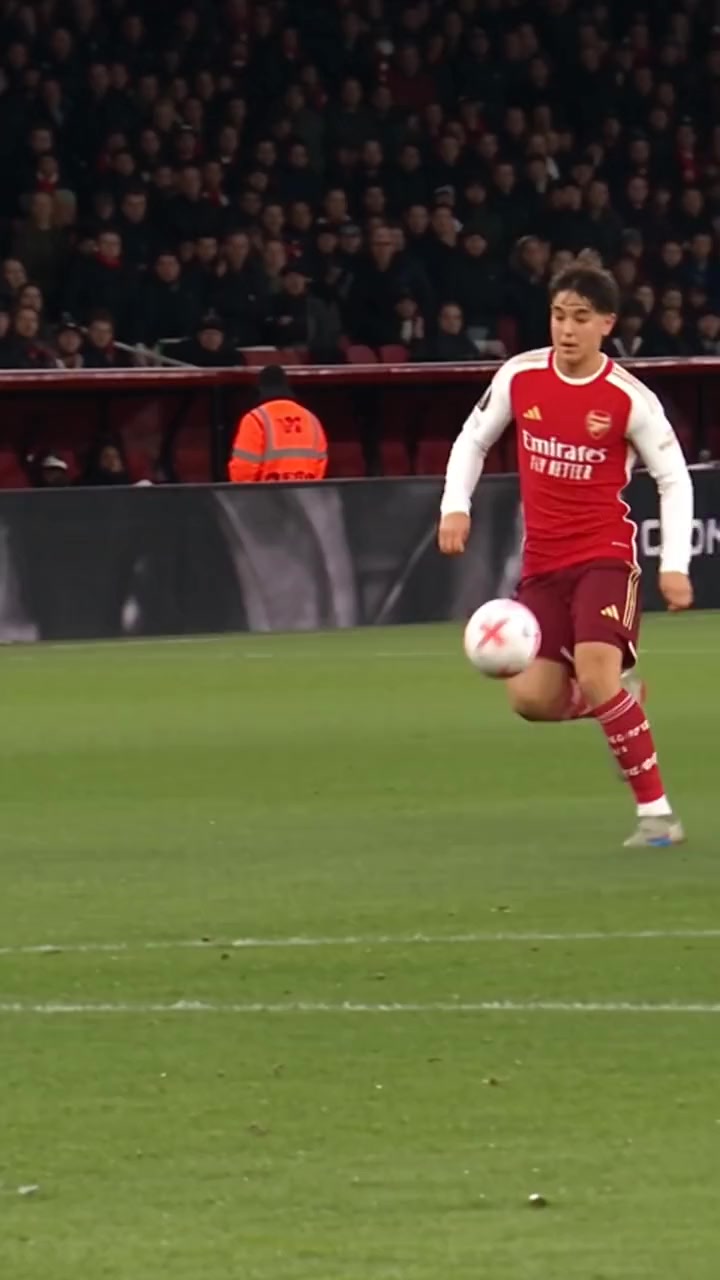
Özil goal AI trend
People remake a famous solo goal by Mesut Özil with someone unexpected as the scorer: themselves, a friend, a parent or a grandma. The run past the defenders and the keeper, the finish and the crowd stay the same.
How to do it
Open the Solo Goal template, add one clear photo of the new scorer and create. The striker keeps the kit from the clip; face, hair and build come from the photo.
Template: Solo Goal · 1 photo · 15 sec, vertical · 285 credits
2. Spreading since September 2026
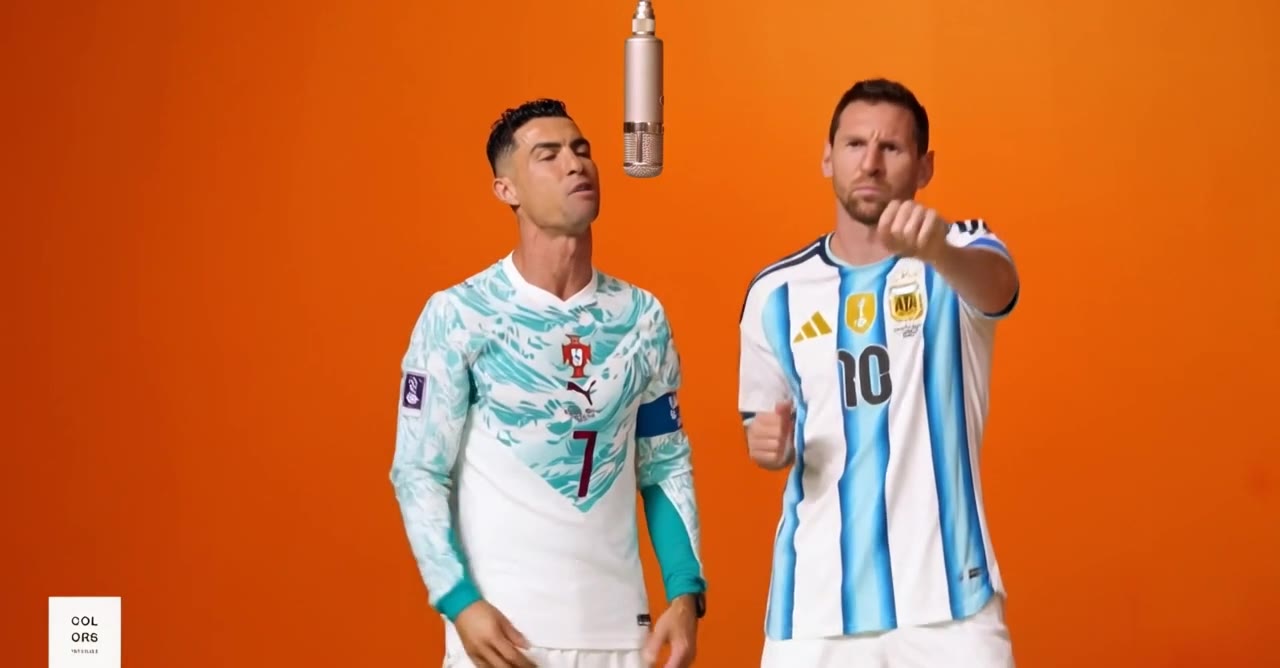
Hotel Lobby AI trend
Also called the Migos AI trend
Two people trade rap lines in the famous orange COLORS booth with one microphone hanging from the ceiling. The moves and the beat stay; the two rappers change.
How to do it
Open the Orange Rap Duo template and add two photos: photo 1 raps on the left, photo 2 on the right. Use your own photo twice to rap both parts.
Template: Orange Rap Duo · 2 photos · 15 sec, landscape · 285 credits
3. A running joke on TikTok and Reels
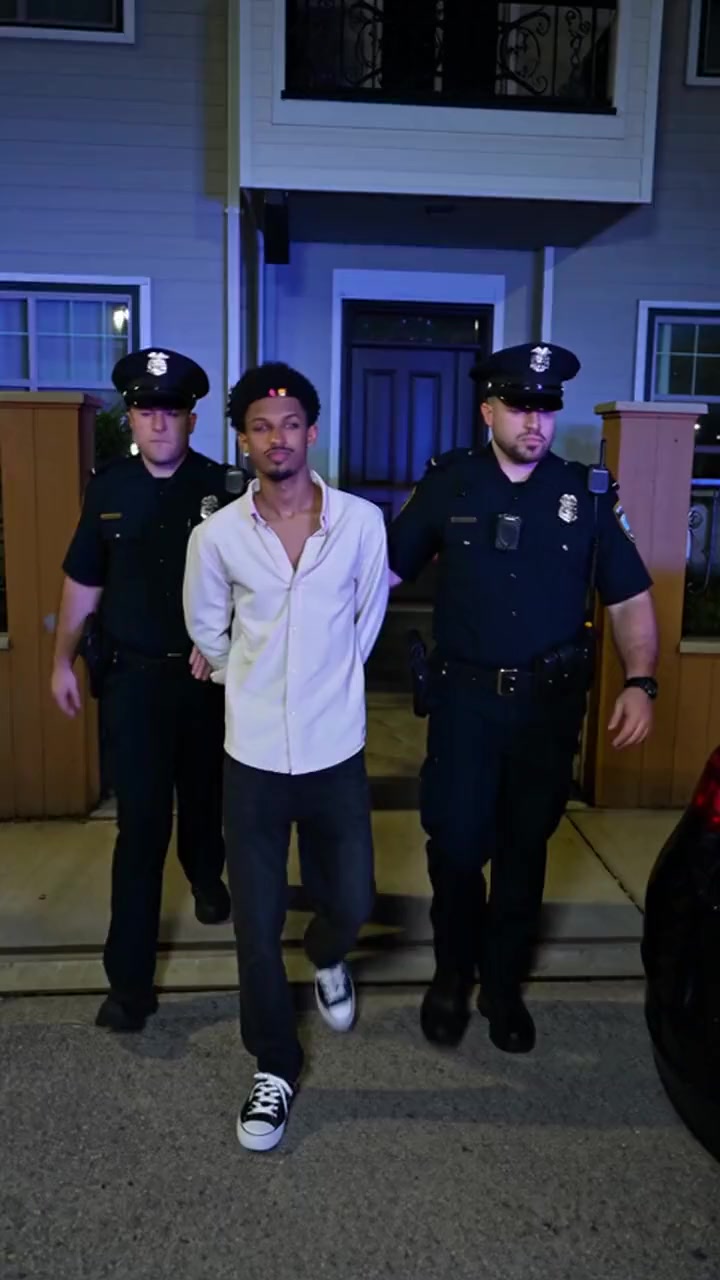
AI arrest trend
Two officers walk someone to the car at night while that person turns to the camera and smirks, completely unbothered. The joke is the calmest person you know, suddenly “arrested”.
How to do it
Open the Arrest Smirk template, add one photo and create. Post it as a joke and say it is AI, never as something that really happened.
Template: Arrest Smirk · 1 photo · 15 sec, vertical · 285 credits
4. Started as a party clip in late August 2026
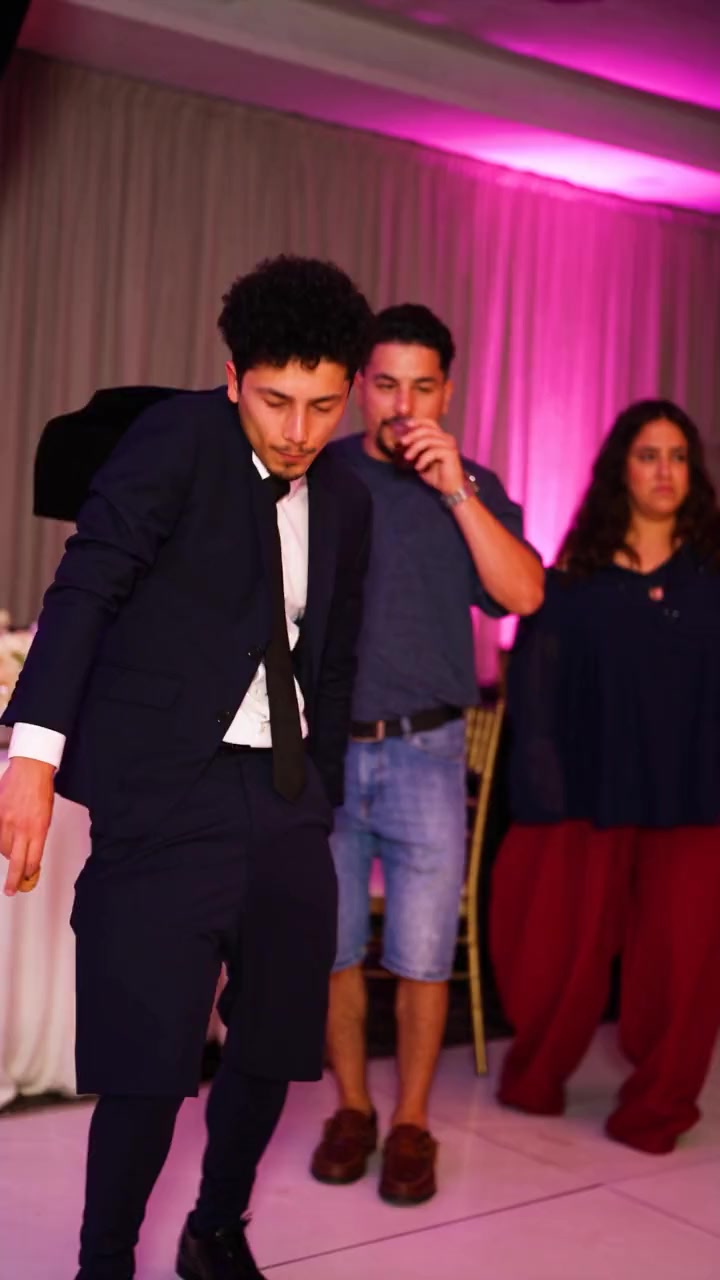
Dime Dime Baby AI trend
Also called the Bby Wow dance
A guest dances into a party, bites a pastry, chews slowly and stares straight into the camera. People now put someone else in the dancer’s place, the less likely the better.
How to do it
Open the Party Snack Dance template, add one photo and create. A straight, confident face photo matches the famous stare.
Template: Party Snack Dance · 1 photo · 8 sec, vertical · 152 credits
5. Trending since October 2026
Bulin 47 AI trend
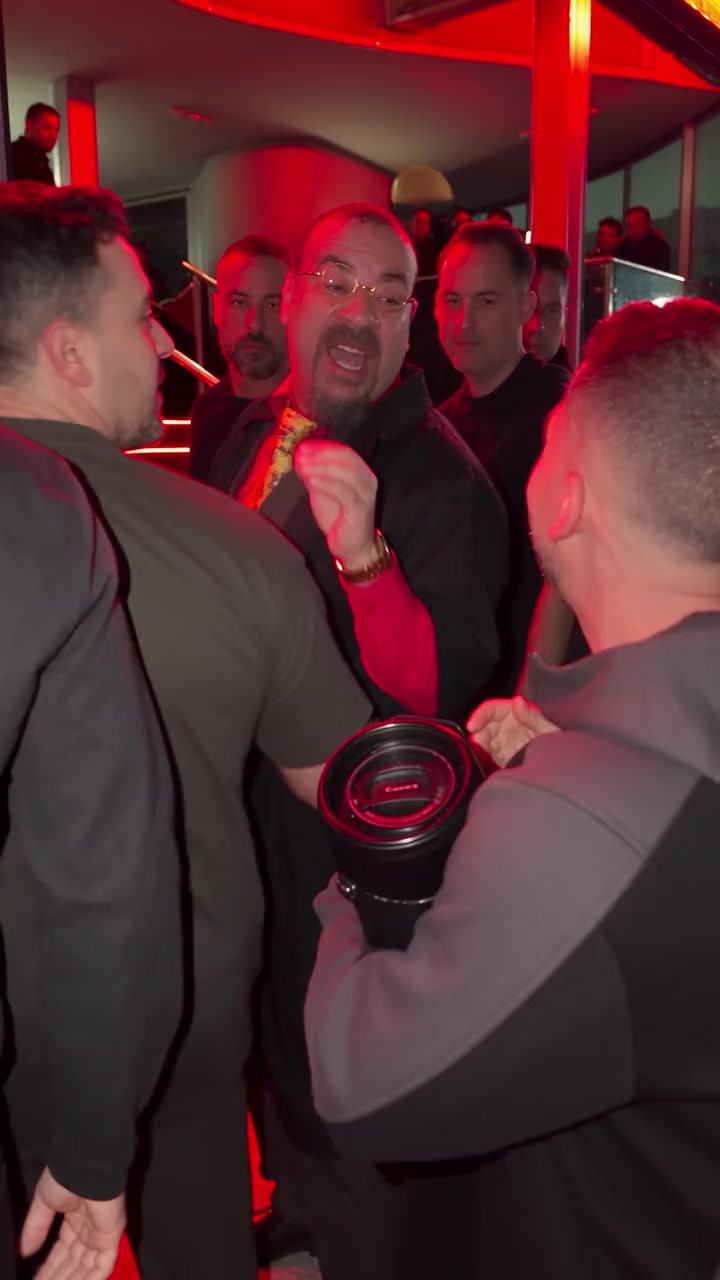
The Dominican dembow artist Bulin 47 freestyling outside a red lit venue, with big hand gestures and the shoulder move people call “dame hombro”. The AI version changes only the singer.
How to do it
Open the Bulin 47 Freestyle template, add one photo and create. The mouth follows the song; the clothes in your photo become the clothes in the video.
Template: Bulin 47 Freestyle · 1 photo · 15 sec, vertical · 285 credits
6. On oVideo since October 20, 2026
Alors on Danse AI trend
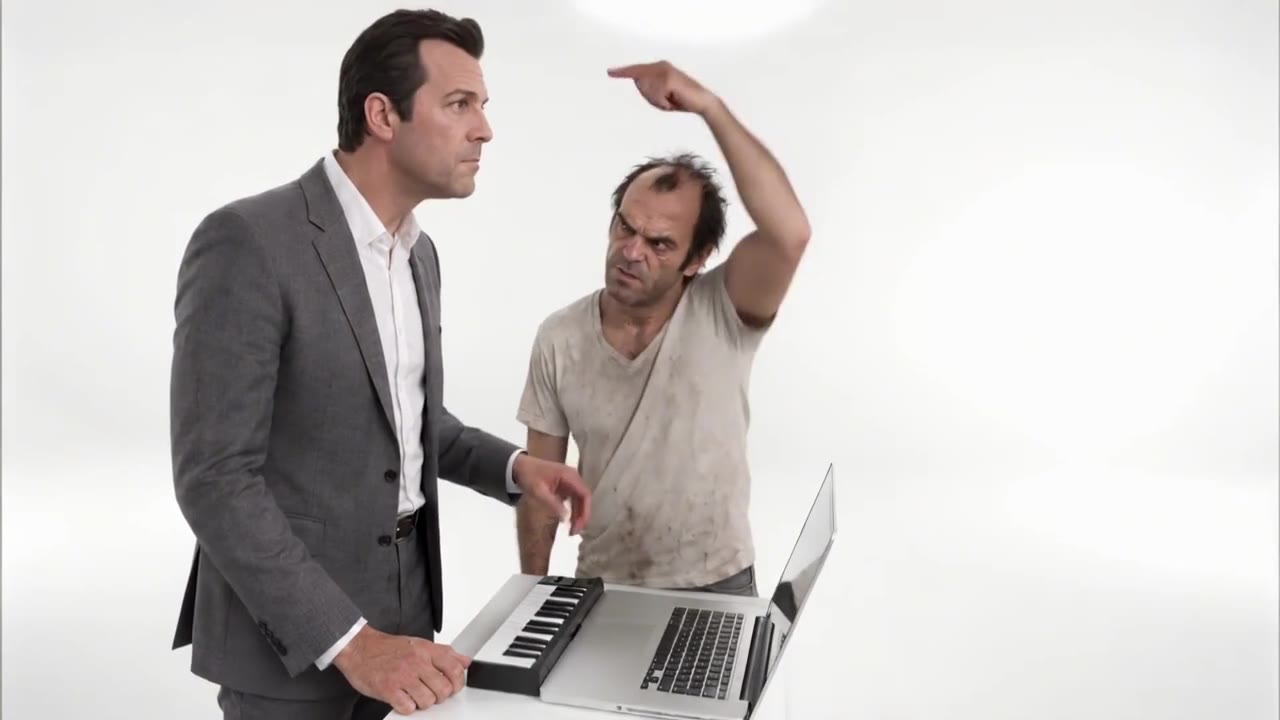
The comedy sketch where one person plays “Alors on danse” dead serious on a tiny keyboard while the other dances and does far too much. There is a pet version with two animals at the keyboard and the laptop.
How to do it
Open the Keyboard Duo template and add two photos: photo 1 plays, photo 2 dances. For pets, the Alors on Danse Pets template takes two pet photos.
Template: Keyboard Duo · 2 photos · 15 sec, landscape · 285 credits
7. The December trend starts in November
Christmas and Santa videos
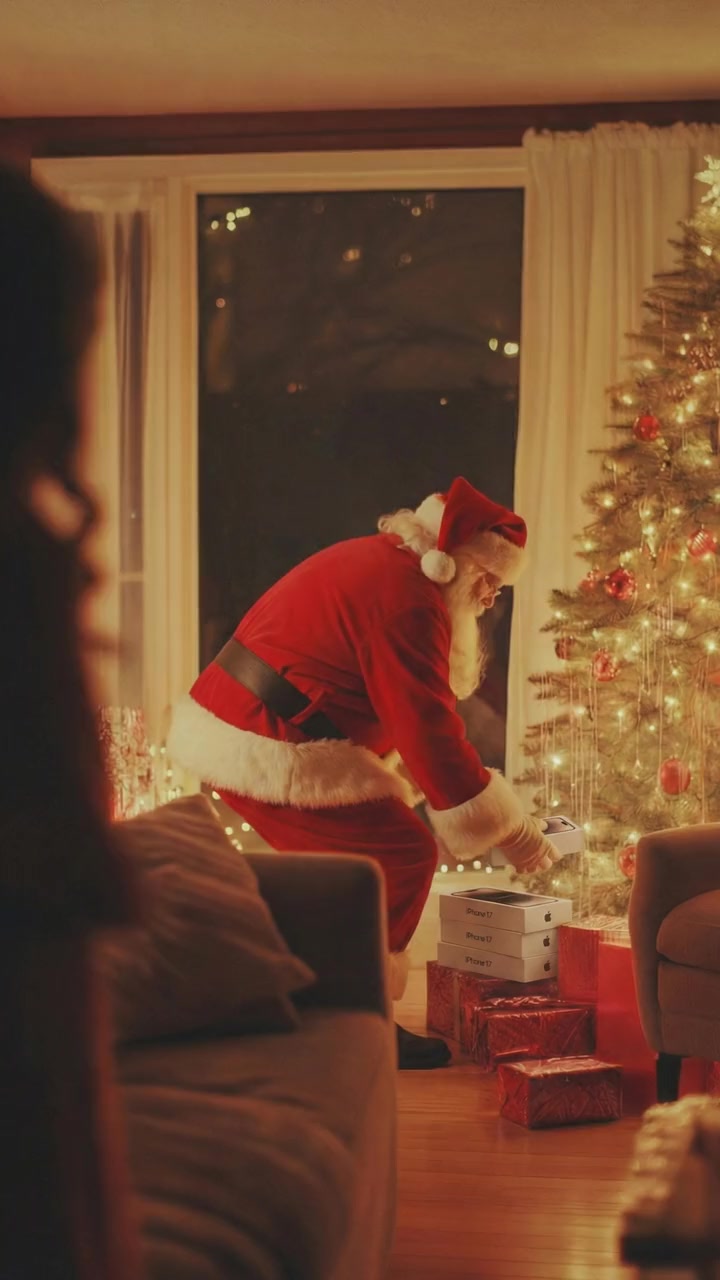
Becoming Santa caught at the tree, Santa on a coffee break, a gift dance on a glowing street or a Christmas tree gown in the snow. Six Christmas templates have been in the app since October 25, 2026.
How to do it
Pick a Christmas template and add one photo. In the Santa scenes your own face stays and the suit and hat come from the clip. There is no elf template yet.
Template: Santa Gets Caught and 5 more · 1 photo · 5 to 10 sec, vertical · 95 to 190 credits
Not on oVideo yet
Trends without a template
These are going round this month too, but oVideo has no ready template for them. Here is what you can and cannot do today.
Not available on oVideo yet
Enzo Fernández celebration
A football celebration with the hands cupped behind the ears, remade with other people.
There is no template for it. If you own a clip of the celebration or may use it, Put Yourself In can swap one person into 3 to 15 seconds (up to 30 with Premium) of it.
How to do the Enzo celebrationNot available on oVideo yet
Bad Times
One woman in a bright kitchen arguing with the camera to Imael Angel’s song, remade with other people.
There is no template for it. With a clip you may use, Put Yourself In swaps one person into 3 to 15 seconds (up to 30 with Premium) of it, song kept.
How to do the Bad Times trendNot available on oVideo yet
Damon Salvatore
Damon’s church entrance from The Vampire Diaries: the doors, the guests turning, the smirk.
There is no template for it. With a clip of the scene you may use, Put Yourself In puts you in his place.
How to do the Damon trendNot available on oVideo yet
Burning Bridges
The chandelier party shot from Drake’s video, a silver cup raised to the camera.
There is no template for it. With a clip you may use, Put Yourself In swaps one person into 3 to 15 seconds (up to 30 with Premium) of it.
How to do the Burning Bridges trendNot available on oVideo yet
Hit the Road Dude
The pickup truck driver telling people fishing on his land to leave, remade with someone else driving.
There is no template for it. With a clip you may use, Put Yourself In puts you behind the wheel, lines kept.
How to do the Hit the Road Dude trendNot available on oVideo yet
Storm
The crowd scene from the STORM II video: one calm person in the middle while a crowd in dark blazers moves as one.
There is no template for it. With a clip you may use, Put Yourself In makes you the person in the middle, crowd and sound kept.
How to do the Storm trendNot available on oVideo yet
Turn the Lights Off
The solo club dance under blue light, eyes closed, known as the Jon Hamm dancing meme.
There is no template for it. With a clip you may use, Put Yourself In swaps you onto the dance floor, song kept.
How to do the Turn the Lights Off trendNot available on oVideo yet
NYC subway trend
A still pose on a New York platform while the train rushes past, now with a new outfit after every train.
There is no template for this exact trend. With a clip you may use, Put Yourself In puts you on the platform; one swap keeps one outfit.
How to do the subway trendNot available on oVideo yet
Gas Station Dance
A gas station clip in three shots: a forecourt dance, a laughing selfie, then a car exit and a dance on the beat drop.
There is no template for it. With a clip you may use, Put Yourself In swaps you into the car shot after the drop, sound kept.
How to do the gas station danceNot available on oVideo yet
Marlon
Marlon’s late night street video and his pool video, remade with other people in his place.
There is no template for it. With a clip you may use, Put Yourself In puts you on the street or by the pool, his sound kept.
How to do the Marlon trendNot available on oVideo yet
Eşref Tek
A Turkish trend: people put themselves into the hotel, car and suit scenes of the series Eşref Rüya.
There is no template for it. With a scene you may use, Put Yourself In puts you in Eşref’s place, music kept.
How to do the Eşref Tek trend (in Turkish)Not available on oVideo yet
GTA 6
Ahead of the GTA VI launch on November 19, people put themselves into GTA 6 trailer shots and gameplay, or make a GTA 6 style picture of themselves.
There is no template for it. With a GTA clip you may use, Put Yourself In makes you the character, sound kept; for a picture, the AI image tool and one selfie.
How to put yourself in GTA 6Not available on oVideo yet
GTA AI trend
A GTA style version of yourself, as a filter picture, loading screen art or a video in a GTA clip.
There is no template for it. The video version is Put Yourself In with the clip or its link; the picture version is a selfie and a prompt.
How to do the GTA AI trendNot available on oVideo yet
Bollywood AI video
People put themselves into Bollywood song clips, lately Tu Mil Jaaye from the film King, released on November 2.
There is no template for it. With a song clip you may use, Put Yourself In makes you the main dancer, music kept; one person on Standard, up to 4 on Premium.
How to make a Bollywood AI videoNot available on oVideo yet
Dancinha IA
A Brazilian trend: the viral TikTok dance of the moment, made with AI from one photo instead of filming.
There is no template for each dance. With a dance clip you may use, Put Yourself In makes you the dancer, song kept.
How to do the dancinha IA trend (in Portuguese)Not available on oVideo yet
Smalltown Boy
A two person trend set to the 1984 Bronski Beat song.
No template yet. On your own clip, Put Yourself In Standard replaces one main person per video, while Premium replaces up to 4 people, one photo each, placed by a short prompt, so a two person version works with a clip you may use.
Not available on oVideo yet
Raindance
A couples trend set to the song Raindance.
No template yet. Same as above: Standard replaces one main person per video on your own clip, and Premium can swap both people of a couple clip you may use, one photo each. For two people on a template, try the Hotel Lobby or Alors on Danse trends.
How to do the Raindance trendNot available on oVideo yet
Roblox “In this town” stories
Story Shorts with blocky game characters, each opening on one strange rule (“In this town, if you lie, you turn blue”) and ending on a twist.
There is no template for it. Story to Video turns your own written episode into a narrated video with blocky 3D characters you describe; no Roblox avatars or gameplay.
How to make a town rule storyNot available on oVideo yet
Minecraft story videos
Story Shorts set in a blocky game world: animated stories with cube shaped characters, or a story read aloud over a Minecraft parkour run.
There is no template for it. Story to Video turns your own written story into a narrated video with blocky 3D characters you describe; for a story over parkour, Shorts and split screen play Minecraft gameplay clips.
How to make a Minecraft story videoNot available on oVideo yet
AI Bigfoot and Yeti vlogs
Selfie style vlogs where Bigfoot or the Yeti films his own day in the woods and talks to the camera, deadpan.
There is no template for it. Story to Video turns your written episode into a vertical video with the same creature in every scene, talking with lip sync.
How to make an AI Bigfoot vlogNot available on oVideo yet
AI baby podcasts
Babies in big headphones at podcast microphones, talking with grown up voices about baby sized problems.
There is no template for it. Story to Video draws AI babies (not real children) from your description and makes them say your lines with lip sync.
How to make an AI talking baby videoFor any one person trend you saw on TikTok, Reels or Shorts, paste the link into Put Yourself In, pick 3 to 15 seconds (up to 30 with Premium) and add your photo, as long as you own the clip or may use it. For a trend with two to four people, Premium takes one photo per person.
Sports and stunts
The AI basketball trend and stunt videos
Ordinary people dunking in front of a crowd went round in October 2026, and stunt clips never stop. oVideo has three dunk scenes and six backflip, skydive and jump scenes, one photo each: see the AI video of me dunking and AI video of me doing a backflip guides. Not sure which app made a trend you saw? Read what app people are using for the AI videos.
How to choose
Which trend to make
- 1Just you, and it should be funny: the AI arrest or Dime Dime Baby; both are about the stare at the camera.
- 2A football fan in the family: the Özil goal, with grandma or dad as the scorer.
- 3You and a friend: the Hotel Lobby rap duo or Alors on Danse, one photo each, or any clip of two you may use with Premium.
- 4Your dog or cat: Alors on Danse Pets, two pet photos.
- 5A Christmas greeting: Santa Gets Caught or Santa’s Coffee Break, with your own face as Santa.
- 6A trend that is not listed: your own clip or a link in Put Yourself In: 3 to 15 seconds and one person on Standard, or up to 30 seconds and up to 4 people on Premium.
Facts
Trend templates: the numbers
- Input
- One clear photo per person in the clip. No prompt
- Resolution
- 720p, vertical 9:16 or landscape 16:9 like the original
- Price
- 19 credits per second: 152 to 285 credits for the trends above, 95 to 190 for the Christmas scenes. Shown before you create
- Plans
- From $10 a month ($7.50 billed yearly) for 400 credits; the free plan has no swaps
- Failed videos
- Refunded automatically
- Time
- Usually about 10 minutes; the video lands in your gallery
- Watermark
- None
- Your own clip
- Put Yourself In: up to 60 seconds and 200 MB, or a link, 3 to 15 seconds (30 on Premium, up to 4 people), 720p or 1080p (26 credits per second; Premium 29 at 720p and 43 at 1080p)
Before you post
Tips to catch a trend
- Post while the sound is still trending; most of these peak for a few weeks.
- Pick the least likely person: grandma scoring, dad in the rap booth, the quiet friend arrested.
- One person per photo, face clearly visible, soft even light.
- Use photos of people who said yes, and label the video as AI.
Answers
Frequently asked questions
- What are the biggest AI video trends in November 2026?
- The Özil goal AI trend, the Hotel Lobby (Migos) rap duo, the AI arrest trend, Dime Dime Baby, the Bulin 47 freestyle, Alors on Danse and, as December gets closer, Santa and Christmas videos. All seven can be made on oVideo from photos with a ready template.
- Which AI trends can I do with just one photo?
- The Özil goal (15 seconds), the AI arrest (15), Dime Dime Baby (8), the Bulin 47 freestyle (15) and the Santa and Christmas scenes (5 to 10). Each needs one clear photo of the person who should star in it.
- Which trends are for two people?
- The Hotel Lobby rap duo and Alors on Danse, each with one photo per person. Alors on Danse also has a pet version that takes two pet photos.
- How do I make an AI trend video?
- Open the trend’s template on oVideo, add one photo per person, confirm the people in the photos agreed and press create. The video keeps the moves, the camera and the sound of the trend, and is ready in about 10 minutes.
- Do I need to write a prompt?
- No. Each template already holds the moves, the camera and the sound; your photos decide who is in it.
- Are these AI trends free?
- Not on oVideo. Templates cost 19 credits per second at 720p: 152 credits for Dime Dime Baby, 285 for the 15 second trends and 95 to 190 for the Christmas scenes. Credits come with paid plans from $10 a month ($7.50 billed yearly); there are no free swaps. The price is shown before you create, and a failed video is refunded automatically.
- Can I do a trend that is not on this list?
- Often, yes. Put Yourself In takes your own clip up to 60 seconds and 200 MB, or a TikTok, Reels or Shorts link, as long as you own the clip or may use it. Pick 3 to 15 seconds (up to 30 with Premium) and the main person in them becomes the one in your photo.
- Can I do the Enzo celebration, Smalltown Boy or Raindance trend?
- Not with a ready template yet. The Enzo celebration is a one person moment, so Put Yourself In does it with a clip you may use (see the Enzo Fernández celebration AI trend guide); for the two person trends, Standard replaces only one main person per video, but Premium on your own clip takes up to 4 people, one photo each, so they work as a pair with a clip you may use.
- Can I do the Storm, Turn the Lights Off or NYC subway trend?
- Yes, with a clip you may use. Each has one main person, so Put Yourself In swaps you into 3 to 15 seconds (up to 30 with Premium) of it from one photo, with the sound kept. None of them has a ready template; each has its own step by step guide, and for the subway outfit change version you make one swap per outfit.
- Can I do the Bad Times, Damon Salvatore, Burning Bridges or Hit the Road Dude trend?
- Yes, with a clip you may use: each has one main person, so Put Yourself In swaps you into 3 to 15 seconds (up to 30 with Premium) of it from one photo, with the sound kept. None of them has a ready template; each has its own step by step guide.
- Can I make a Santa video for Christmas?
- Yes. Santa Gets Caught and Santa’s Coffee Break put the person from your photo in the red suit and hat, with their own face, in a 10 second clip. Santa has no lines; a Santa who talks to your child by name is a different kind of product.
- Can I use a celebrity’s or the original creator’s face?
- The trends are about putting someone else in the scene. Only use photos of yourself or of people who agreed to it, and never use anyone’s face without their permission.
- How long does a trend video take?
- Usually about 10 minutes. You can close the page; the video is saved to your gallery when it is ready, without a watermark.
- Does it work on my phone?
- Yes. It runs in the browser on iPhone, Android and computers, so there is no app to install.
- Should I say it is AI when I post it?
- Yes. TikTok, Instagram and YouTube ask creators to label realistic AI videos, and saying so keeps the joke friendly. That matters most for the AI arrest trend.
- When was this list checked?
- On November 6, 2026, against the templates live in the oVideo app. The full list of every trend template is on the AI video trends page.
Browse by theme
All AI video templates- Rich lifestyleSupercars, private jets, cash and champagne.
- Action movie scenesExplosions, stunts and fight scenes.
- Fashion and runwayRunway walks, studio shoots, street style.
- Sports highlightsGoals, dunks and boxing.
- Singing and rapStudio sessions, rap duos, DJ sets.
- FantasyDragons, wolves and epic places.
- DanceViral dances, shuffles and duos.
- PetsDogs and cats that dance, play music and pose.
- Halloween costumesWitches, vampires, zombies and skeletons.
- ChristmasSanta, Christmas dresses and holiday dances.
Your photo, your video
- Used only for your videoYour photo and clip go only to the AI that makes your video, and they are kept in your account.
- Private until you share itThe finished video waits in your gallery; nothing is posted for you unless you choose to publish it.
- Deleted when you askEmail support@ovideo.io and your uploads and videos are deleted within 30 days.
- Only people who said yesUse photos of yourself or of people who agreed, and turn on the AI label when you post.
Details in the privacy policy. How it works: Put Yourself In help and what credits cost.
Related
- AI character swap videoPut yourself in any video from one photo, sound kept.
- Video face swapSwap your face into a clip online with one photo.
- AI dance generatorDance any viral dance from one photo, solo or with friends.
- Put yourself in a football videoScore the goal or take over your own match clip from one photo.
- Özil goal AI trendBe the scorer of the viral solo goal from one photo.
- Best apps for the Özil goal trendEight tools that do the trend, checked November 2026.
- Best AI dance video appsSeven photo to dance tools, checked November 2026.
- Best Christmas video appsSix apps for funny Christmas videos with your face.
- AI trend videosJoin viral trends with one photo per person.
- AI face swap videoPut your face into any clip with one photo.
- AI body swapSwap your whole look, build and outfit into a video.
- AI character swapReplace anyone in a video with someone new.
- AI dance videoMake yourself dance from one photo.
- Make a photo move like a videoYour photo copies the moves of any clip.
- Recreate a video with yourselfRemake any clip with you in the main role.
- Swap yourself in from a linkPaste a TikTok, Reel or YouTube Short and add one photo.
- Put yourself in a TikTokCopy the TikTok link, paste it and add one photo.
- Put yourself in an Instagram ReelPaste a Reel or video post link and add one photo.
- Put yourself in a YouTube ShortPaste a Shorts link, or a video up to 3 minutes.
- Put yourself in a music videoBecome the singer, rapper or dancer, with the song kept.
- AI face swapSwap faces in any photo, hair included.
- AI head swapSwap the whole head in a photo, not just the face.
- Multiple face swap videoSwap two or three people into one clip.
- AI pet swapSwap your own dog or cat into a viral pet clip.
- AI video trendsReady made viral templates for one or two people.
- Viggle AI alternativesFive swap tools compared, prices checked October 2026.
- Higgsfield alternativesFive tools for viral templates and swaps, prices checked October 2026.
- PixVerse alternativesFive tools for viral templates, swaps and dance videos, checked October 2026.
- Best AI character swap toolsNine swap tools, ordered by what each is best for.
- Best face swap video appsSix face swap tools for video, compared October 2026.
- Best AI body swap appsFive whole body swap apps for dance trends and duos, compared November 2026.
- Best face swap appsSeven face swap tools for photos, compared October 2026.
- Best AI pet dance appsSix tools that make a dog or cat dance, compared October 2026.
- Put yourself in a movie scenePlay the lead in a scene you may use, sound kept.
- AI Santa videoBecome Santa in a Christmas clip from one photo.
- Why does my face swap look wrong?Causes and fixes for blurry, wrong person or out of sync swaps.
- Magic Hour alternativesFive swap tools compared, checked November 2026.
- AI character swap statistics 2026How people really use swaps, from our own data.
- Elf Yourself alternativesSeven elf dance tools with your face, checked November 2026.
- How to elf yourselfThe app, a real looking AI elf, or your own elf clip.
- Put yourself in a Christmas moviePlay the lead in a Christmas scene you may use, sound kept.
- AI Christmas video ideas28 ideas for TikTok, Reels and Shorts, each with how to make it.
- Enzo Fernández celebration AI trendDo the hands behind the ears celebration with your own face.
- Tip Toeing in My Jordans AI trendBe the tiptoeing dancer from the viral barn clip.
- AI stadium fan cam trendBe the fan the big screen camera finds, crowd kept.
- Best AI motion transfer appsKling Motion Control, Viggle, Krea and more, vs a real clip swap.
- Reface alternativesSix face swap apps compared, plus FaceApp vs Reface.
- Kling AI alternativesKling and Kling Motion Control alternatives, compared.
- How to replace a person in a videoCharacter replacement step by step, from one photo, sound kept.
- Can ChatGPT make a video of me?No, but a clip and one photo can. No prompt needed.
- Bad Times AI trendDo the kitchen argument with your own face, song kept.
- Damon Salvatore AI trendWalk into the church scene as you, from one photo.
- Burning Bridges AI trendRaise the silver cup under the chandeliers as you.
- Hit the Road Dude AI trendBe the driver in the pickup truck meme, lines kept.
- CapCut AI template alternativeTemplate stuck at 99%? Do the trend from the trend clip itself.
- Storm AI trendStand still in the middle while the whole crowd moves, sound kept.
- Turn the Lights Off AI trendDance alone under the blue club light as you, song kept.
- NYC subway AI trendPose on the platform while the train rushes past, from one photo.
- Gas Station Dance AI trendStep out of the car and dance by the pumps as you, sound kept.
- Marlon AI trendTalk to the camera on the night street as you, from one photo.
- Put yourself in GTA 6Be the character in a GTA clip, or make a GTA 6 picture of you.
- Put your face in the GTA 6 trailerYour whole look in one trailer shot, music kept.
- Raindance AI trendSing by the water in the duet trend as you, song kept.
- Bollywood AI videoPut yourself in a Bollywood song clip, music kept.
- AI video of me dunkingMake the dunk from one photo, crowd sound kept.
- AI video of me doing a backflipFlip on a plane wing or skydive from one photo.
- What app are people using for the AI videos?The app behind each kind of viral AI video.
- 30 second face swap videoSwap up to 30 seconds of your clip with Premium, sound kept.
- AI video of me and my friendsUp to 4 of you in one clip for up to 30 seconds, sound kept.
- How to put yourself in a videoThe free overlay way and the AI way: one photo into any clip, sound kept.
- How to put yourself in a video twiceYour photo in two to four slots, up to 30 seconds.
- Put yourself in a Sora videoSora cameos are gone; do the same job from one photo, friends too.
- Put yourself in a video gameYou in a gameplay or trailer clip, or a game style picture of you.
- Face swap video promptCopy and paste who becomes who prompts for Premium.
- AI couple dance videoYou and your partner in a duo dance, song kept.
- How to make an AI video of yourselfFive ways from one photo: a real clip, a template, a talking photo or a story.
- AI hug video generatorTwo people in a real hug clip, from two photos.
- AI video of a deceased loved oneAnimate their photo, a hug with a stand in, or their story narrated. No voice cloning.
- Hug your younger self AI videoYou today and you as a child, in one hug clip.
Pick this month’s trend
Open a template, add one photo per person and get the trend with the original sound in about 10 minutes.