vs Canva

oVideo vs Canva Video — dedicated AI video generation vs design-first videoCanva makes branded design. oVideo makes AI-narrated social video.

Canva is an excellent design tool with video capabilities. oVideo is a dedicated AI video generator. Both can produce social video, but from very different starting points. This comparison helps creators and marketers choose the right tool for their video workflow.

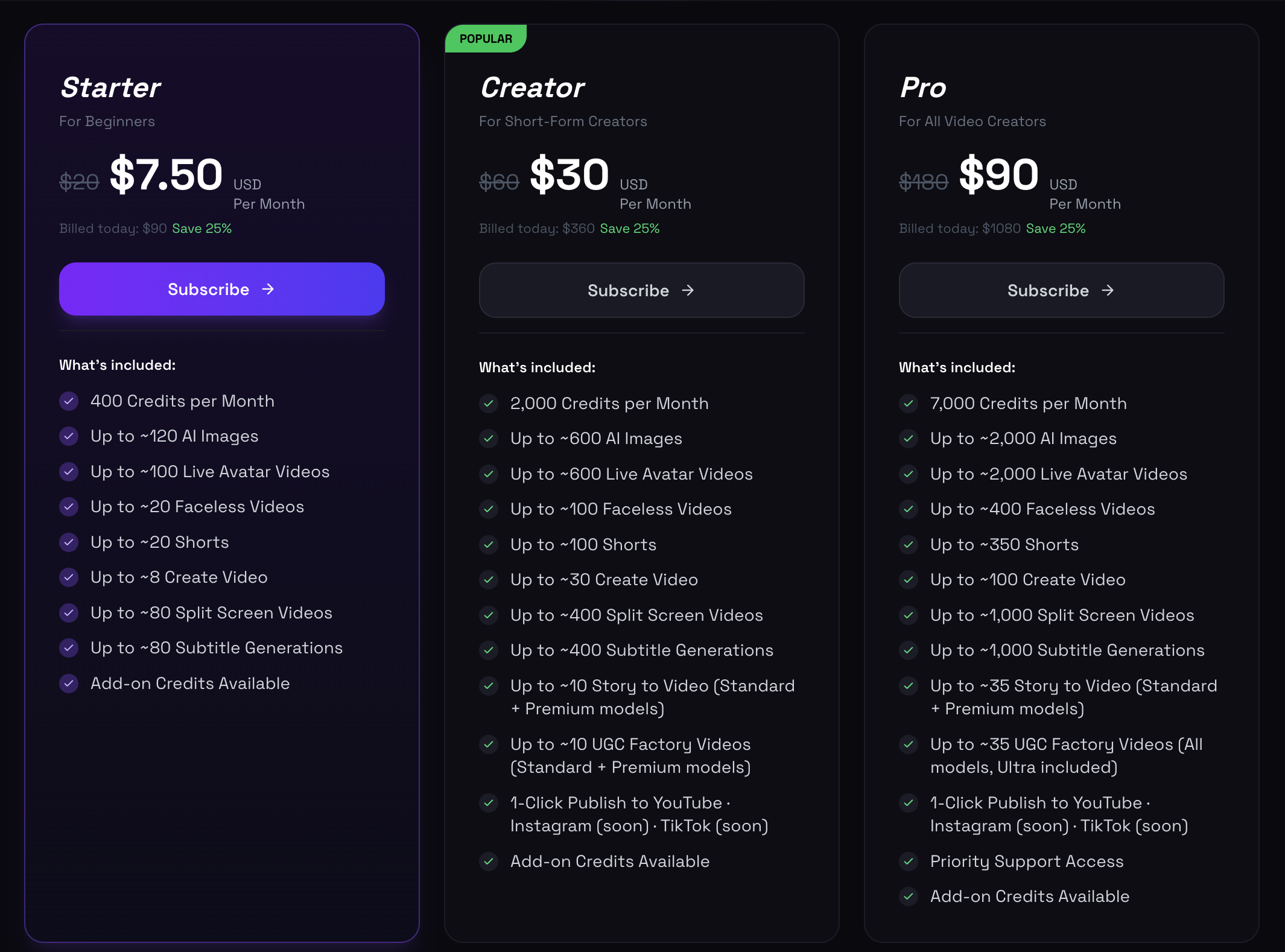
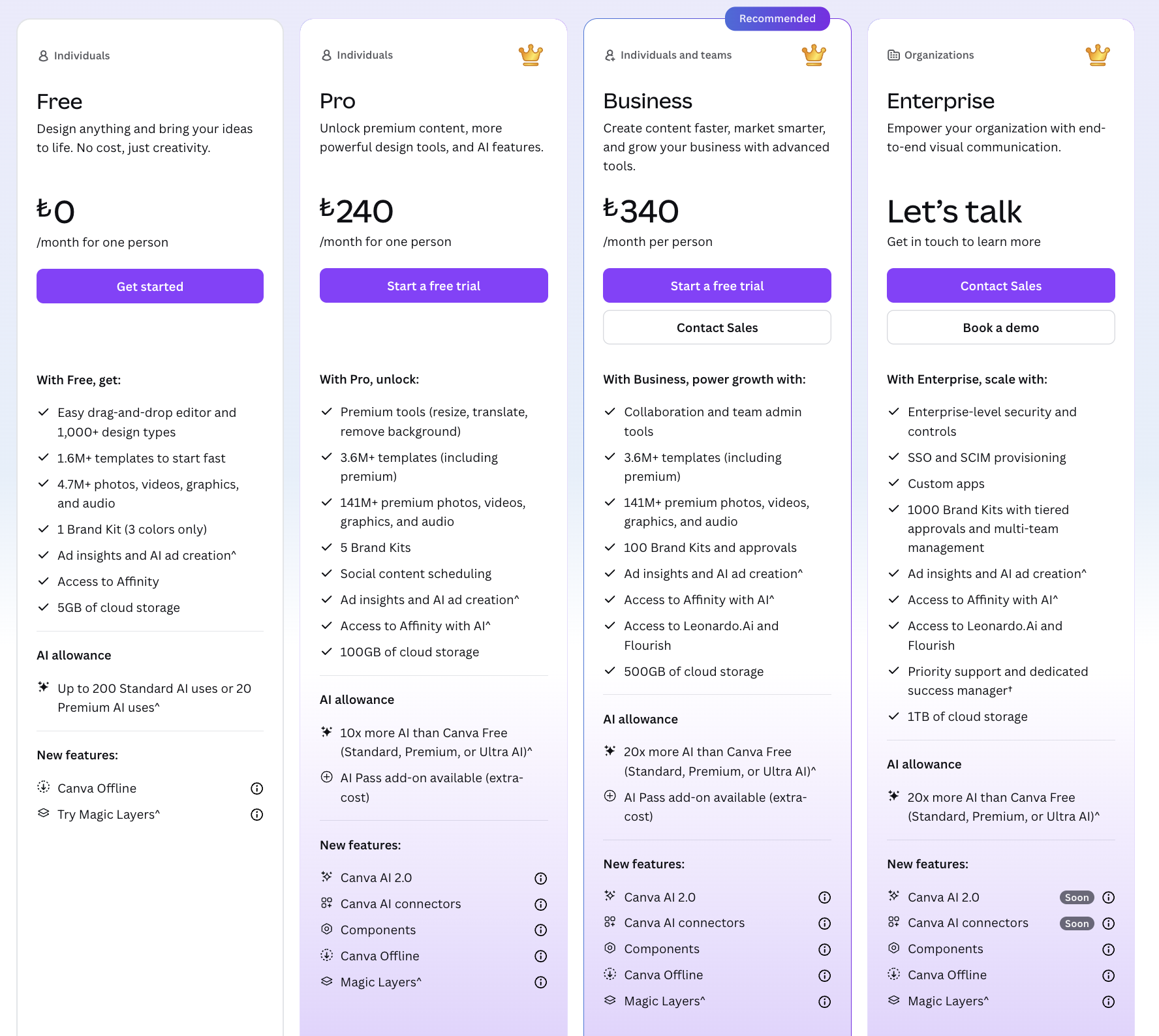
Design-first vs generation-first workflows comparedWhich tool is faster for daily social videoCanva Pro vs oVideo pricing breakdown

Canva: design-first tool with video capabilities

Canva's video tools are built on top of its design platform — you start with a template, add visuals, and overlay text and animation. It is excellent for branded graphics and presentation-style video, but requires significant manual assembly.

oVideo: generation-first tool built specifically for video

oVideo's entire platform exists for one purpose: generating narrated social video from text. Every feature — voiceover, scene selection, caption sync — is part of a single automated generation step.

Voiceover: oVideo includes it, Canva requires configuration

oVideo's AI voiceover is part of the core generation workflow — select a voice and the narration is created automatically. Canva's video lacks native AI voiceover — you need to record, upload, or use a separate tool.

oVideo vs Canva Video — key differences for social creators

The practical workflow comparison for daily social video production.

publish faster
  1. 1

    Speed: oVideo generates a complete narrated Short from script in 90 seconds. Creating a comparable Canva video requires template selection, text editing, visual swaps, voiceover upload, and caption overlay — 20–40 minutes.

  2. 2

    Voiceover: oVideo includes professional AI narration in every video generation. Canva does not have native AI voiceover — creators must record and upload separately or use Canva's limited text-to-speech.

  3. 3

    Caption generation: oVideo auto-generates and syncs captions. Canva requires manual caption text overlay on each video — there is no automatic captioning from script.

  4. 4

    Brand design: Canva wins for brand-consistent visual design — logos, brand colors, custom fonts, and Canva's massive template library are superior to oVideo's automated visual matching.

  5. 5

    Social video at volume: oVideo wins — generating 30 videos per month is straightforward. Creating 30 Canva videos manually is a significant time investment.

Choose oVideo over Canva Video when

The scenarios where a dedicated AI video generator outperforms a design tool.

You need daily video with AI narration and captions
You want to generate from script without template assembly
Your priority is social video volume over brand design control
You are posting daily to TikTok, Reels, or YouTube Shorts
You want captions and voiceover automatically included
You are a content creator, not a graphic designer

Related guides

Frequently asked questions

Is Canva better than oVideo for making social media graphics?
Yes. Canva is the best tool for static social media graphics, infographics, and brand design. oVideo is purpose-built for video — it does not compete with Canva on static design.
Can Canva make the same videos as oVideo?
Canva can produce social video but requires significantly more manual work — template selection, text overlay, voiceover upload, and caption styling. oVideo automates all of this from a written script.
Does Canva have AI video generation?
Canva has added AI features including text-to-image and some video generation capabilities. However, its video generation is not as complete or purpose-built as oVideo's script-to-social-video workflow.
Is Canva Pro cheaper than oVideo?
Canva Pro is $15/month and includes video tools. oVideo Creator is $29/month. However, Canva Pro does not include AI voiceover or automated captioning — adding those capabilities requires additional tools on top of Canva.
Can I use both Canva and oVideo in the same workflow?
Yes. Use Canva for branded thumbnails, graphics, and static social assets. Use oVideo for AI-generated video content. Many creators and marketing teams run both tools for their respective strengths.