
Kapwing: collaborative online editor
Kapwing shines for teams editing together in the browser — subtitles, repurposing clips, templates, and shared workspaces. Its AI assists editing rather than generating a complete video from a prompt.
Kapwing is a collaborative browser video editor with AI subtitles, repurposing, and team workspaces. oVideo is an AI generator that turns a prompt into a finished narrated, captioned short video. Here's which fits your workflow and budget.
oVideo vs Kapwing
The verdict
Kapwing is a collaborative browser editor — great for teams editing clips together with AI subtitles. oVideo generates the whole short video from a prompt (narration, stock footage, captions) from $7.50/month. Choose Kapwing for collaborative editing; choose oVideo to generate finished social video at volume.
| Feature | oVideo | Kapwing |
|---|---|---|
| Best for | Generating short-form social video from a prompt | Collaborative browser editing |
| Starting price | $7.50/mo | Free / Pro $16/member/mo |
| Most popular plan | $30/mo | $16/member/mo (Pro) |
| Generates video from a prompt | ✓ | ✗ |
| AI voiceover narration | ✓ | ✗ |
| Auto captions / subtitles | ✓ | ✓ |
| Auto-matched stock footage | ✓Automatic | ✗You supply footage |
| Team collaboration | Lightweight | ✓Strong |
| No watermark | ✓(all paid plans) | ✗Free plan watermarked |
| 1-click publish to social | ✓ | ✗ |
| Free plan | ✓ | ✓(watermark, 720p) |
oVideo pricing
Best value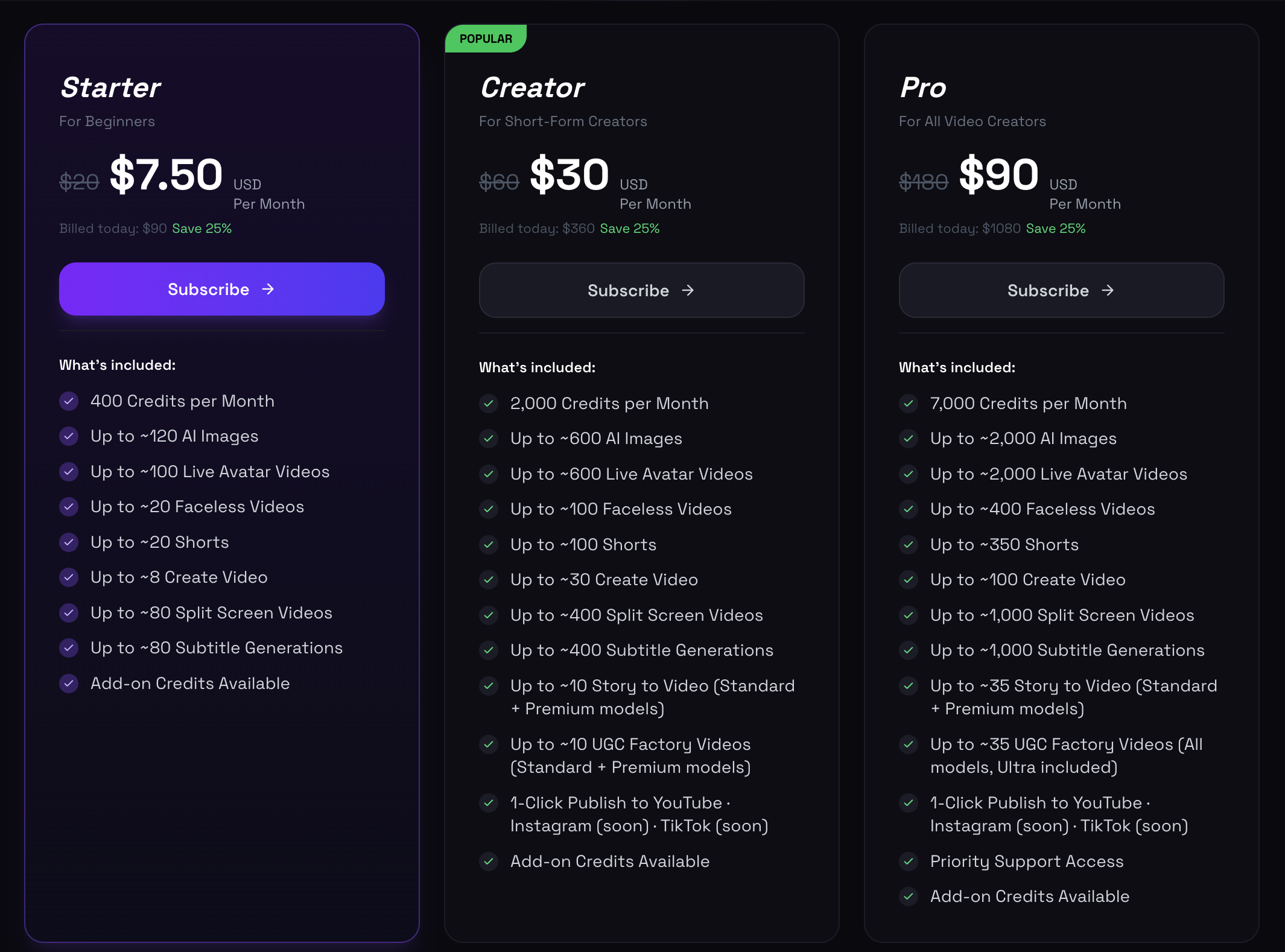
oVideo starts at $7.50/month for 400 credits. The popular Creator plan is $30/month for 2,000 credits — around 100 short videos and 600 AI images a month.
Kapwing pricing
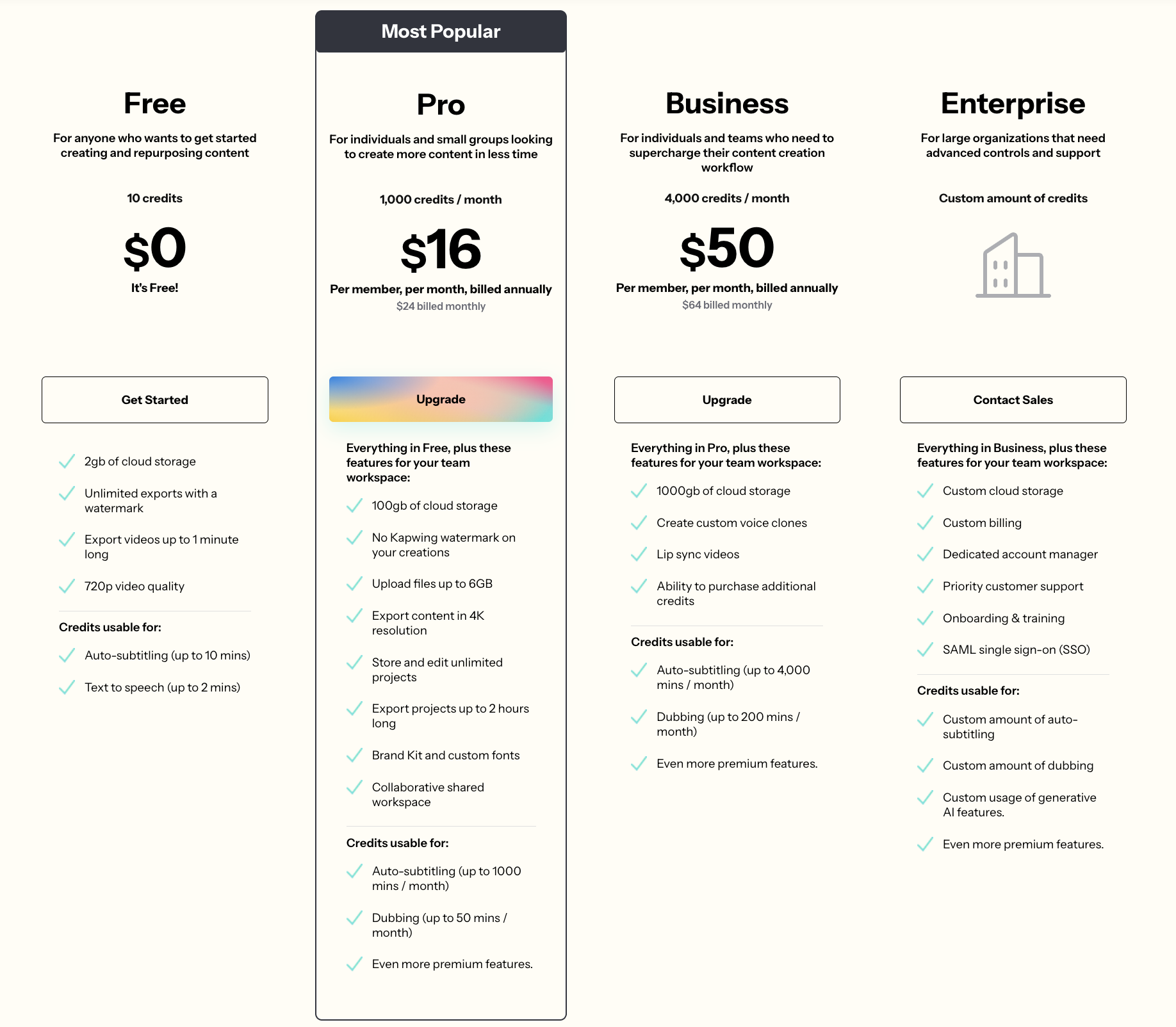
Kapwing offers a free plan (watermark, 720p), Pro at $16/member/mo, Business at $50/member/mo, and Enterprise. Pricing is per member and credit-based, built around collaborative editing.
Made with oVideo
Every clip below was produced end-to-end with oVideo — script to voiceover, footage, and captions. Press play to see the actual output.
Blueprint of 9/11: The Five-Year Plot Behind the Twin Towers Attack
9:16 vertical·720p
Shadowlands: The True Horror of Chewbacca
9:16 vertical·720p
Mind-Blowing Space Facts You Didn't Know!
9:16 vertical·1080p
Kapwing shines for teams editing together in the browser — subtitles, repurposing clips, templates, and shared workspaces. Its AI assists editing rather than generating a complete video from a prompt.
oVideo produces the entire video automatically — narration, matched stock footage, and captions — from a short prompt or script. No timeline assembly needed.
Kapwing charges per member (Pro $16, Business $50). oVideo starts at $7.50/mo and is built around finished-video volume — roughly 100 short videos on the $30 plan.
The workflow
Where each tool wins.
Step 01
Workflow: Kapwing is a collaborative editor — you assemble and edit. oVideo generates the whole video from a prompt.
Step 02
Footage: Kapwing edits clips you upload. oVideo auto-matches stock footage to your narration.
Step 03
Collaboration: Kapwing is strong for teams editing the same project. oVideo is built for fast solo or brand content generation.
Step 04
Watermark: Kapwing's free plan adds a watermark and caps quality. oVideo has no watermark on paid plans starting at $7.50/mo.
Step 05
Pricing: Kapwing Pro $16/member/mo, Business $50/member/mo. oVideo $7.50–$90/mo on output volume.
Where oVideo shows up
The use cases where oVideo is the better pick.
Keep exploring
Answers