vs VEED

oVideo vs VEED — generate a video vs edit oneVEED edits video. oVideo generates it from a prompt.

VEED is a popular browser-based video editor with AI tools like auto-subtitles and translation. oVideo is an AI generator that turns a prompt or script into a finished short video — narration, matched stock footage, and captions in one pass. This comparison shows which workflow fits you.

Editor vs generator — two different workflowsPricing per user vs per videoWhich is faster for social content

oVideo vs VEED

oVideo vs VEED: which should you pick?

VEED is a browser-based video editor with excellent AI subtitles and translation — best when you already have footage and want to polish it. oVideo is a generator: describe the video and it produces narration, matched stock footage, and captions automatically, from $7.50/month. Choose VEED to edit; choose oVideo to generate finished short-form video fast.

FeatureoVideoVEED
Best forGenerating short-form social video from a promptEditing footage in the browser
Starting price$7.50/mo$10/user/mo
Most popular plan$30/mo$21/user/mo (Pro)
Generates video from a prompt
AI voiceover narration
Auto captions / subtitles
Subtitle translationAI video translation
Auto-matched stock footageAutomaticYou supply footage
Story-to-video
1-click publish to social
Free plan

Pricing compared

oVideo pricing

Best value
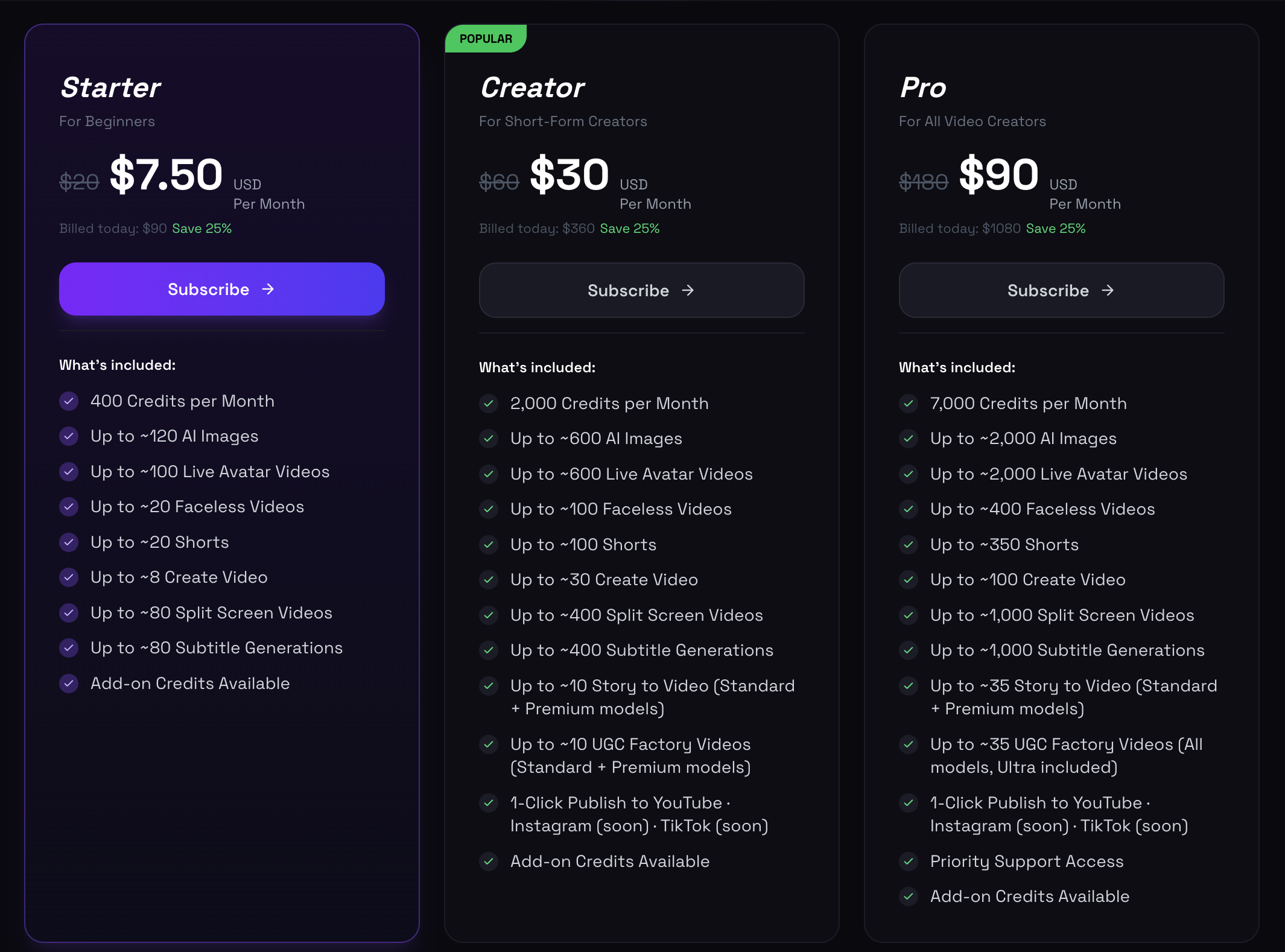
oVideo pricing: Starter $7.50/mo, Creator $30/mo, Pro $90/mo

oVideo starts at $7.50/month for 400 credits. The popular Creator plan is $30/month for 2,000 credits — around 100 short videos, 100 faceless videos, and 600 AI images a month.

VEED pricing

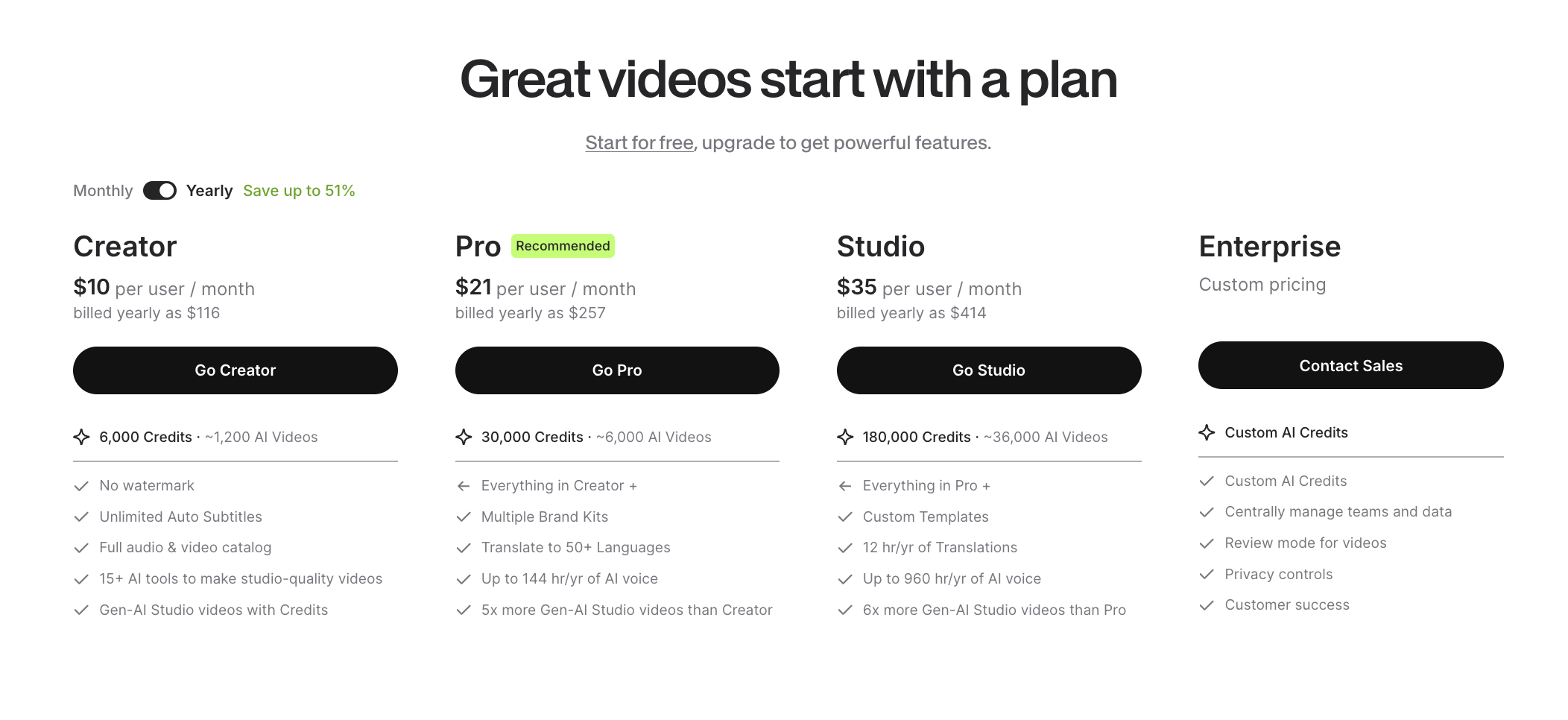
VEED pricing: Creator $10/mo, Pro $21/mo, Studio $35/mo, Enterprise

VEED is priced per user: Creator $10/mo, Pro $21/mo, Studio $35/mo (billed yearly), plus Enterprise. Plans are credit-based and centered on editing, auto-subtitles, and translation.

VEED: browser video editor with AI add-ons

VEED is built for editing footage you already have — trimming, subtitles, translations, brand kits, and screen recording, all in the browser. Its AI features assist editing rather than generate a video from scratch.

oVideo: generates the whole video from a prompt

With oVideo you describe the video and it produces narration, scene-matched stock footage, and captions automatically — no timeline editing required. Ideal when you want finished short-form video fast.

Pricing: per user vs per video output

VEED is priced per user ($10–$35/mo) around editing credits. oVideo starts at $7.50/mo and is built around finished-video output volume — roughly 100 short videos a month on the $30 Creator plan.

oVideo vs VEED — the key differences

Where each tool wins.

publish faster
  1. 1

    Workflow: VEED is a manual editor — you assemble and edit clips. oVideo generates the full video from a prompt, no editing required.

  2. 2

    Subtitles & translation: VEED is strong here with auto-subtitles and multi-language translation. oVideo also auto-captions every video, generated as part of the video.

  3. 3

    Footage: VEED expects you to upload or supply footage. oVideo automatically matches stock footage to every line of narration.

  4. 4

    Speed to publish: oVideo's prompt-to-video flow is faster when you need a finished social video; VEED is faster when you already have raw footage to polish.

  5. 5

    Pricing: VEED $10–$35/user/mo. oVideo $7.50–$90/mo built around finished-video volume.

Choose oVideo over VEED when

The use cases where oVideo is the better pick.

You want a finished video from a prompt, not a timeline to edit
You don't have raw footage to start from
Your output is TikTok, Reels, Shorts, or YouTube
You need AI narration + matched stock footage automatically
You want high video volume at a low monthly cost
You're building a faceless channel or brand social presence

Related guides

Frequently asked questions

Is VEED a video generator or editor?
VEED is primarily an online video editor with AI-assisted features like auto-subtitles and translation. It edits footage you provide rather than generating a full video from a prompt the way oVideo does.
Does oVideo edit video like VEED?
oVideo includes a light editor to tweak scenes, but its core is generation — it builds the whole video (narration, stock footage, captions) automatically. For heavy manual timeline editing, VEED is more specialized.
Which is cheaper, oVideo or VEED?
oVideo starts at $7.50/month and is priced around finished-video volume. VEED is priced per user from $10/month. For producing many short videos, oVideo typically delivers more output per dollar.
Can oVideo add subtitles like VEED?
Yes — oVideo auto-captions every video it generates. VEED specializes in adding subtitles and translations to existing footage; oVideo bakes captions into the generated video.
Which is better for TikTok and Reels?
For generating ready-to-post short-form videos quickly, oVideo. For hands-on editing of footage you already filmed, VEED.