vs Pictory

oVideo vs Pictory — which AI video tool wins for social media creators?Pictory repurposes long-form. oVideo creates short-form from scratch.

oVideo and Pictory serve different primary use cases. Pictory is built around converting long-form content (articles, podcasts) into video. oVideo is built for creating short-form social video from scratch. This comparison shows which fits your workflow.

Clear use case breakdown — who each tool is built forSide-by-side pricing and feature comparisonShort-form vs long-form: which workflow fits you

Pictory: repurposing-first, long-form focus

Pictory's core use case is converting existing long-form content — blog posts, articles, webinars — into shorter video clips. If you have a long-form content library to repurpose, Pictory handles that workflow well.

oVideo: creation-first, short-form focus

oVideo is built to generate complete short-form videos from new scripts and ideas. If your primary output is TikTok, Reels, and Shorts — content you are creating fresh rather than repurposing — oVideo is the better fit.

Pricing: Pictory starts higher for short-form output

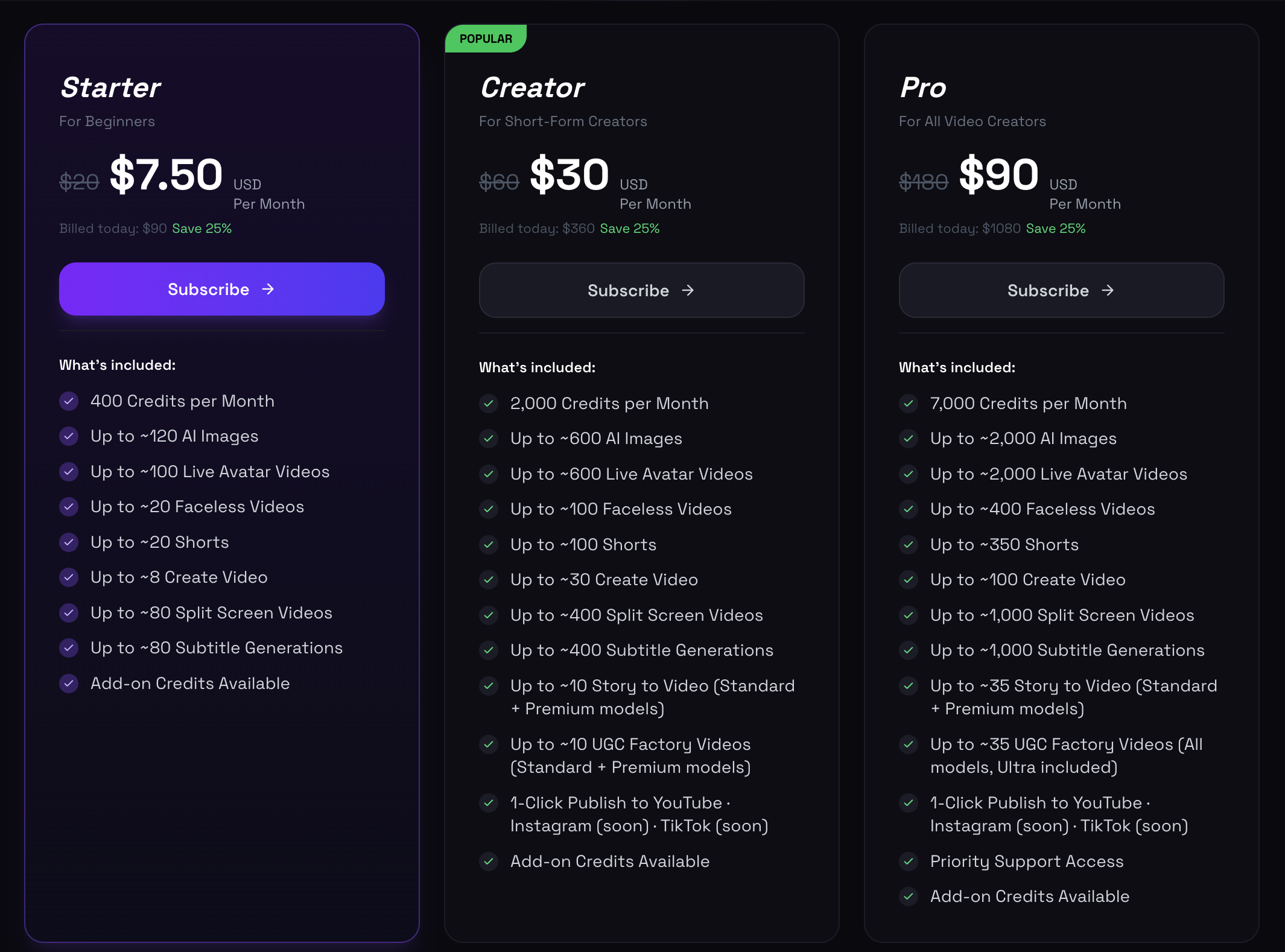
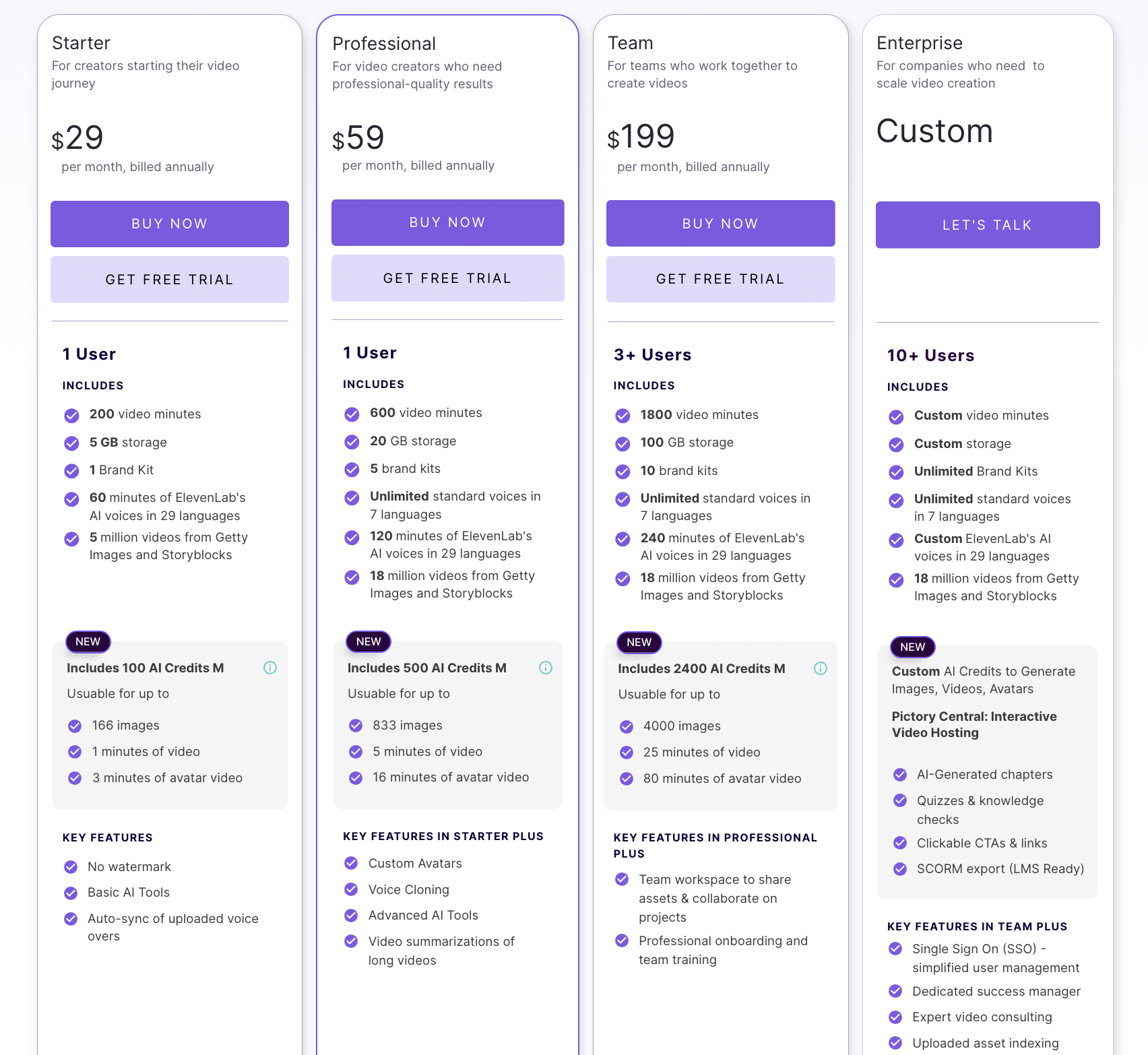
Pictory's Starter plan is $19/month for 30 video projects. oVideo's Starter is $10/month for approximately 20 short-form videos. For dedicated short-form creators, oVideo delivers more per dollar.

oVideo vs Pictory — where each tool wins

The decision breakdown for creators comparing both platforms.

publish faster
  1. 1

    Short-form social video (TikTok, Reels, Shorts): oVideo wins — purpose-built for 9:16, 30–90 second generation from scripts. Pictory's short-form output requires more steps.

  2. 2

    Blog-to-video repurposing: Pictory wins — their article-to-video pipeline is mature and handles long URLs directly. oVideo requires manual script extraction from the blog post.

  3. 3

    Voiceover quality: Both offer AI voices. oVideo includes 35+ voices with natural pacing in the generation step. Pictory's voices are functional but require more manual pacing adjustment.

  4. 4

    Caption generation: oVideo generates and syncs captions automatically. Pictory auto-captions are available but reported as less accurate for fast-paced content.

  5. 5

    Platform publishing: oVideo offers 1-click YouTube publishing on Creator+ plans. Pictory does not include direct platform publishing.

Choose oVideo over Pictory when

The scenarios where oVideo is the stronger choice.

You primarily create short-form content from original ideas
Your main channels are TikTok, Reels, or YouTube Shorts
You need daily video production at under 3 minutes per video
You want 1-click YouTube publishing in your workflow
You are building a faceless channel from scratch
You need high-quality AI voiceover included in the base price

Related guides

Frequently asked questions

Is Pictory better than oVideo for repurposing blog content?
For pure blog-to-video repurposing, Pictory's direct URL import is more convenient. oVideo requires manually writing the script from the blog content. However, oVideo's output is more optimized for social media performance.
Can oVideo do what Pictory does?
Partially. oVideo can convert blog content to video when you paste the key points as a script. It cannot directly import a blog URL. For frequent blog repurposing, Pictory's import workflow saves time.
Is oVideo cheaper than Pictory?
At entry level: oVideo $10/month vs Pictory $19/month — oVideo is cheaper. At mid-tier: oVideo $29/month (100 videos) vs Pictory $39/month (60 videos) — oVideo delivers more videos per dollar.
Which tool is better for a faceless YouTube channel?
oVideo. Faceless channels require daily script-to-video production, hook-optimized Shorts, and YouTube direct publishing — all of which are oVideo's core strengths. Pictory is better for episode clip repurposing.
Can I use both oVideo and Pictory together?
Yes. Some creators use Pictory for repurposing long-form archives and oVideo for daily original short-form production. They serve different parts of the content calendar without overlap.