
Face swap any videowith one photo
Upload a clip and a photo of you. oVideo puts your face into the video and it sings, talks and moves exactly like the original, with the original sound. Your hair and outfit come along from the photo, so it looks like you were really there.
From 19 credits per second
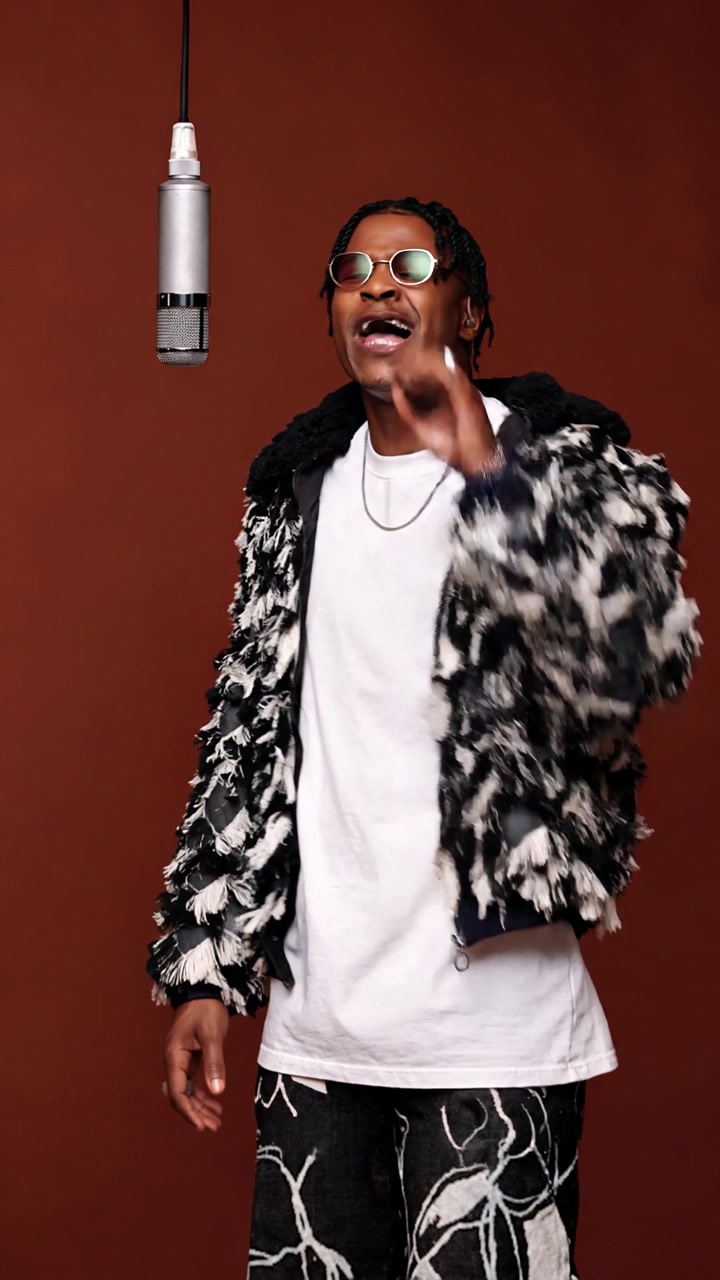
Original singer top left, the face swapped video behind it.
At a glance
AI face swap video: the facts
- Input
- One video and one photo of the person to put in
- Clip length
- Upload up to 60 seconds and 200 MB, then swap any 3 to 15 seconds
- Resolution
- 720p or 1080p, in the shape of your clip (vertical or landscape)
- Sound and lip sync
- The original audio is added back automatically and the mouth follows it. No editing needed
- What changes
- Face, hair, body and outfit, all taken from your photo
- What stays
- Every move, the camera, the background and the timing
- Price
- 19 credits per second at 720p, 26 at 1080p, or one video from $1.99 with no plan. Shown before you create; failed videos are refunded
- AI model
- Kling 3.0 Omni, run in the browser. No app to install
How it works
Put your face in a video in three steps
- 01
Upload the video
Any clip up to 60 seconds. Pick the 3 to 15 seconds you want to star in.
- 02
Add your photo
One clear photo with your face visible. This is the face, hair and outfit you will have in the video.
- 03
Create
The AI follows every move, expression and camera angle of the clip, then adds the original sound back.
Why it looks real
Your face, not a mask
Classic face swap apps cut a face out of your photo and paste it over the face in the video. The skin tone, hairline and head shape rarely match, and it shows the moment the person turns.
oVideo works differently: the AI films the scene again with you in it. Your face is drawn in the light of the scene, from every angle the camera shows, with your own hairline. The trade off is that your hair and the clothes from your photo replace the original ones too, which is usually exactly what people want from a remake.
Ideas
Videos people put their face in
- Music videos. Sing the hook of a famous performance with the original song and your lips in sync.
- Movie and TV scenes. Recast a classic scene with yourself or a friend for a birthday or a group chat.
- Memes and reactions. Drop your face into the reaction clip everyone already knows.
- Dances and sports. Be the one doing the viral dance or scoring the goal, without learning the moves.
Better results
Tips for a clean face swap
The photo
- One person, face fully visible, no sunglasses or hands in front of it.
- Soft, even light. A blurry or dark photo gives a blurry face.
- Waist up or full body, wearing what you want to wear in the video.
The video
- One main person, visible for most of the clip.
- Choose the strongest 3 to 15 seconds: the AI copies that part exactly.
- Vertical or landscape both work; the result keeps the shape of your clip.
No clip of your own?
Try a viral trend template
Pick a ready made clip, add a photo per person and skip the upload.
Answers
Frequently asked questions
- How do I face swap a video with AI?
- Upload the video to oVideo, pick the 3 to 15 seconds you want, add one clear photo of the face you want in it and press create. The AI rebuilds the clip with that person, keeps every move and camera angle, and puts the original sound back.
- Can I put my face in any video?
- Yes. Any clip up to 60 seconds and 200 MB works: a music video, a movie scene, a dance, a sports moment or your own footage. It works best when one person is clearly visible and their face is not hidden for most of the clip.
- Does it change only the face?
- No, and that is on purpose. The AI rebuilds the whole person from your photo, so your face, hair and the outfit in the photo all show up in the video. The result looks like you were filmed there, not like a mask on someone else. If you want a certain look, use a photo where you wear it.
- Does the face swapped video keep its sound?
- Yes. The original audio, whether music, speech or crowd noise, is added back to the finished video in sync with the motion.
- How much does a video face swap cost?
- It is priced per second of video: 19 credits per second at 720p and 26 credits per second at 1080p. A 10 second face swap at 720p is 190 credits. You see the price before you create, and if a video fails, the credits come back automatically. No plan? You can buy a single video once, from $1.99 for 3 seconds up to $7.99 for 15 seconds at 720p.
- How long does it take?
- Most videos are ready in 5 to 30 minutes, depending on length and how busy the AI is. You can close the page; the finished video is saved to your gallery.
- Which photo works best for a face swap?
- One person, face clearly visible and looking roughly at the camera, in good light. Waist up or full body is better than a tight selfie, because the AI also takes the hair and clothes from the photo.
- Is AI face swap legal? Can I use a celebrity?
- Only use photos of yourself or of people who agreed to it. Before every video you confirm that you have permission from the person in the photo. The AI safety filter also refuses some photos, such as famous people or sensitive content; when that happens no video is made and your credits are refunded.
- Which AI model does oVideo use for face swap videos?
- Kling 3.0 Omni. Your clip is the motion reference and your photo is the reference for the person.
Related
- AI body swapSwap your whole look, build and outfit into a video.
- AI character swapReplace anyone in a video with someone new.
- AI dance videoMake yourself dance from one photo.
- AI video trendsReady made viral templates for one or two people.
- Viggle AI alternativesFive swap tools compared, prices checked October 2026.
Put your face in a video
Upload a clip, add one photo and get the face swapped video with its original sound.