
Swap the whole head,hair included
A face pasted under someone else’s hairline never looks right. oVideo swaps the whole head instead: face, hair and head shape from one photo, drawn into the original scene with its light. The body, outfit and background do not change.
Updated
From 20 credits per photo
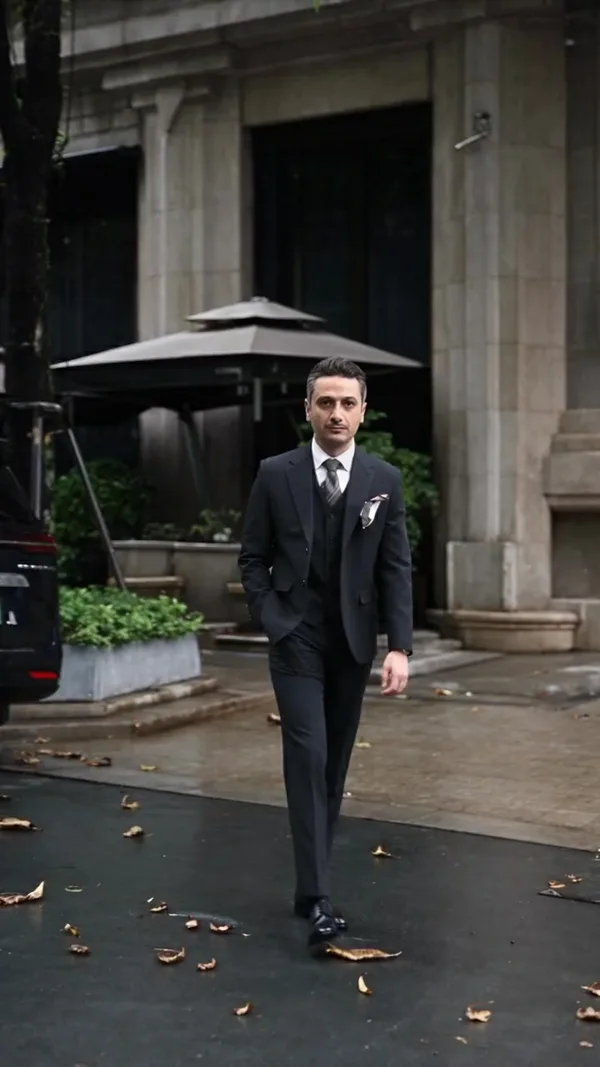
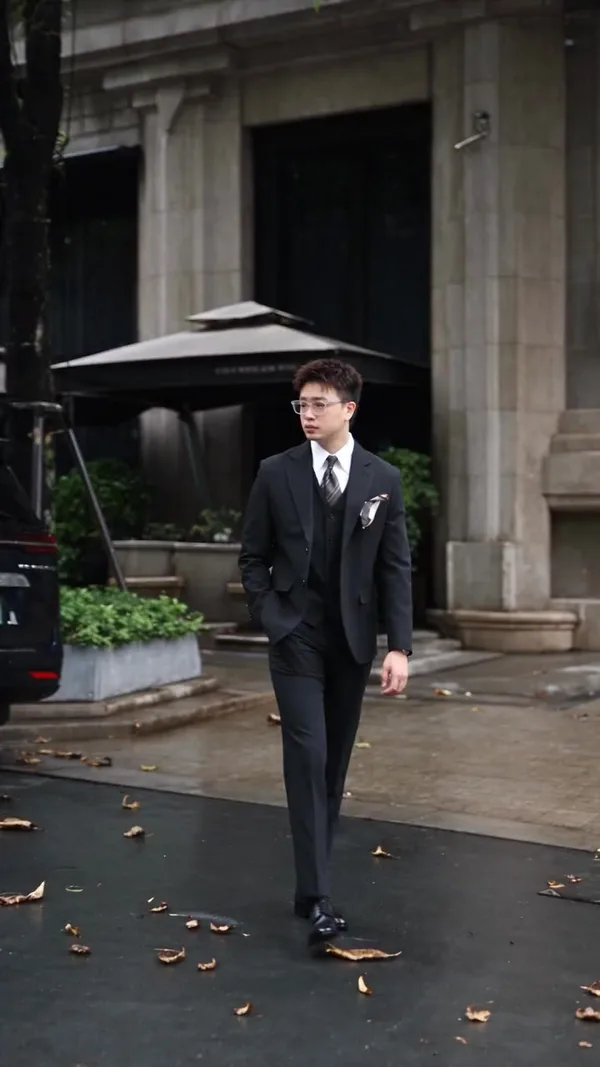
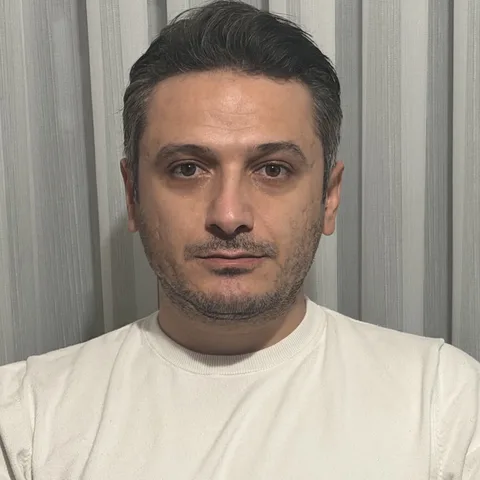
The original photo top left, the head photo bottom left, the head swapped result behind them.
Swap a head in your photo
Your photos stay in your browser until you sign up. You pick the quality and see the price before anything is made.
What is an AI head swap?
An AI head swap replaces the whole head of the person in a photo, hair included, with the head from another photo. On oVideo an automatic mask finds the head, then the AI draws the new head into that space, turned and lit like the original. The body, the outfit, the hands and the background stay exactly as they were.
Head swap vs face swap
Why the whole head looks more real
| Classic face swap | Head swap (oVideo) | |
|---|---|---|
| What moves | Eyes, nose and mouth | The whole head: face, hair, hairline, ears |
| Hair | The original person’s hair stays | The hair from your head photo |
| Head shape | Kept from the original | Taken from your head photo |
| Typical giveaway | A face that does not fit its hairline | A head angle very different from the body |
| Best for | Two people who already look alike | Most photos, even when the two people have different hair |
At a glance
AI head swap: the facts
- Input
- The photo to change and one clear photo of the head to put in
- What changes
- The whole head: face, hair, hairline and head shape
- What stays
- Body, outfit, hands, pose, background, light and the shape of the photo
- Masking
- Automatic. Nothing to select or cut out by hand
- Quality and price
- Fast 20 credits, Balanced 25 credits, Best 35 credits per photo
- Speed
- Usually under a minute; failed swaps are refunded automatically
- AI model
- Ideogram Character, run in the browser. No app to install
How it works
Head swap a photo in three steps
- 01
Upload the photo
The picture to change. One person, head clearly visible.
- 02
Add the head
A clear photo of the person whose head and hair you want, in good light.
- 03
Create
The mask is made for you. Pick a quality and the new head is drawn in.
Ideas
When a head swap beats a face swap
- Different hair. Another colour or cut: the hair comes along with the face, so it never sits under someone else’s hairline.
- Outfit and scene tryouts. Put your own head on a photo of the suit, the dress or the place you have in mind.
- The better shot. Move a person’s head from the photo where they smiled into the one where everything else is right.
- Costumes and characters. Turn a costume or character photo into you, with your own hair and face.
Better results
Tips for a clean head swap
Want only the face, not the head? See AI face swap. For videos, use AI face swap video.
- Head photo: one person, hair fully in frame, no hats or sunglasses.
- Turn the head roughly the same way in both photos.
- Similar light in both photos makes the neck blend invisible.
- The person in the photo to change should not be tiny in the frame.
Answers
Frequently asked questions
- What is an AI head swap?
- An AI head swap replaces the whole head of the person in a photo, hair included, with the head from another photo. The body, outfit, pose, background and light of the original stay the same, and the AI matches the new head to the light and angle of the scene.
- What is the difference between a head swap and a face swap?
- A face swap moves only the inner face and keeps the original hair and head shape. A head swap moves the whole head with its hair. Head swaps look more natural when the two people have different hairstyles, which is why oVideo always swaps the whole head.
- How do I do a head swap with AI?
- Upload the photo you want to change, add a clear photo of the head you want in it, pick a quality and create. oVideo masks the head automatically, so there is nothing to select or cut out by hand.
- Does the hair come from my photo?
- Yes. The new head is drawn with the hair from your head photo. If you want a certain hairstyle in the result, use a photo of the person with that hair.
- Will the skin tone and light match the body?
- The AI draws the head in the light of the original scene and blends it into the neck. Matching works best when the head photo is evenly lit and the head is turned roughly the same way as in the photo you are changing.
- Can I head swap a group photo?
- Use a photo with one person. In a group photo the AI may change more than one head, so crop it to the person first.
- How much does an AI head swap cost?
- Each photo uses credits: 20 for Fast, 25 for Balanced and 35 for Best quality. Credits come with every oVideo plan, starting at $10 a month for 400 credits. If a swap fails, the credits come back automatically.
- How long does a head swap take?
- Usually under a minute. You can leave the page; the result is saved to your gallery.
- Can I put someone else’s head on a photo?
- Only with their permission. Before every swap you confirm that you may use the face. The AI safety filter also refuses some photos, such as famous people; then nothing is made and your credits come back.
- Which AI model does the head swap?
- Ideogram Character, after an automatic mask finds the head in your photo. Everything outside the mask is left as it is.
Your photo, your video
- Used only for your videoYour photo and clip go only to the AI that makes your video, and they are kept in your account.
- Private until you share itThe finished video waits in your gallery; nothing is posted for you unless you choose to publish it.
- Deleted when you askEmail support@ovideo.io and your uploads and videos are deleted within 30 days.
- Only people who said yesUse photos of yourself or of people who agreed, and turn on the AI label when you post.
Details in the privacy policy.
Related
- AI character swap videoPut yourself in any video from one photo, sound kept.
- Video face swapSwap your face into a clip online with one photo.
- AI dance generatorDance any viral dance from one photo, solo or with friends.
- AI trend videosJoin viral trends with one photo per person.
- AI face swap videoPut your face into any clip with one photo.
- AI body swapSwap your whole look, build and outfit into a video.
- AI character swapReplace anyone in a video with someone new.
- AI dance videoMake yourself dance from one photo.
- Make a photo move like a videoYour photo copies the moves of any clip.
- Recreate a video with yourselfRemake any clip with you in the main role.
- Swap yourself in from a linkPaste a TikTok, Reel or YouTube Short and add one photo.
- Put yourself in a TikTokCopy the TikTok link, paste it and add one photo.
- Put yourself in an Instagram ReelPaste a Reel or video post link and add one photo.
- Put yourself in a YouTube ShortPaste a Shorts link, or a video up to 3 minutes.
- Put yourself in a music videoBecome the singer, rapper or dancer, with the song kept.
- AI face swapSwap faces in any photo, hair included.
- Multiple face swap videoSwap two or three people into one clip.
- AI pet swapSwap your own dog or cat into a viral pet clip.
- AI video trendsReady made viral templates for one or two people.
- Viggle AI alternativesFive swap tools compared, prices checked October 2026.
- Higgsfield alternativesFive tools for viral templates and swaps, prices checked October 2026.
- PixVerse alternativesFive tools for viral templates, swaps and dance videos, checked October 2026.
- Best AI character swap toolsEight swap tools, ordered by what each is best for.
- Best face swap video appsSix face swap tools for video, compared October 2026.
- Best AI body swap appsFive whole body swap apps for dance trends and duos, compared November 2026.
- Best face swap appsSeven face swap tools for photos, compared October 2026.
- Best AI pet dance appsSix tools that make a dog or cat dance, compared October 2026.
Swap a head in your photo
Upload the photo and the head, pick a quality, and get the new photo in about a minute.